


Hardware stores lose somewhere between $18,000 and $25,000 a year from backorder mismanagement. Not from the backorders themselves—from customers who get frustrated waiting, cancel orders, and never come back.
The painful part? Most of this happens because stores handle backorders manually. Someone has to remember to call customers. Someone has to track what's coming when. Someone has to decide whether to hold partial orders or ship what's available. That "someone" is usually whoever happens to be at the counter when a customer asks about their order.
The same breakdown shows up across dozens of hardware stores: stores that rely on memory and sticky notes for backorder communication lose roughly 35% of those customers permanently. Not because the product never came in, but because the customer felt forgotten.
Why hardware backorders spiral into customer relationship disasters
Hardware stores face a backorder challenge that most retail categories don't. Unlike clothing or electronics where customers can wait, hardware customers often need items for active projects. A contractor waiting on specific bolts can't finish a job. A homeowner missing one plumbing fitting has water turned off. The urgency creates pressure that generic retail follow-up can't handle.
The operational breakdown usually starts innocently. A customer orders 50 feet of copper wire, but only 30 feet arrives. The counter person promises to call when the rest comes in. They write it on a notepad. Three days later, a different employee receives the remaining wire but has no idea there's a waiting customer. The note got buried under invoices.
Meanwhile, the customer calls asking about their order. Nobody knows the status without digging through papers. The customer gets three different answers from three different employees. Trust erodes. Even when the full order finally arrives, the relationship is damaged.
This pattern repeats dozens of times monthly in most independent hardware stores. Each instance seems small, but collectively they chip away at customer loyalty and create real operational chaos.
The hidden cost calculation most owners miss
Store owners typically track inventory costs and markup, but rarely calculate the true cost of backorder friction. Here's what the numbers actually look like for a typical neighborhood hardware store doing around $1.2M annually:
Stop losing sales due to inventory gaps.
Hardzly helps you manage stock levels, orders, and supplier interactions efficiently.
- Unified inventory and sales tracking
- Supplier and purchase order management
- Automated workflow and task scheduling
No credit card required
| Cost item | Detail |
|---|---|
| Cancelled backorders | $900–1,400 monthly |
| Customers who don't return | $2,100–3,500 monthly |
| Rush shipping to fix mistakes | $300–600 monthly |
| Staff time tracking orders manually | 12–18 hours weekly |
| Time handling complaints | 8–10 hours weekly |
| Inventory holding from confusion | $1,800–2,400 monthly |
Total annual impact runs between $68,000 and $94,000. For a store running 8% net margins, that's equivalent to losing somewhere between $850,000 and $1.1M in sales.
Most of this is preventable with basic automation patterns that don't require sophisticated systems or technical expertise.
Three automation patterns that actually work in small hardware operations
Pattern 1: The 48-hour acknowledgment rule
Set up automatic communication triggers at three points: order placement, 48 hours after placement, and when any portion ships. The 48-hour touch is critical—it's when customer anxiety peaks but before they've mentally written off the order.
The message doesn't need good news. It just needs to exist. Something like: "Hi Jim, quick update on order #4521. We're tracking your 2-inch galvanized brackets. Current expected arrival is Thursday. We'll update you immediately if anything changes."
This simple pattern alone reduces cancellation rates by roughly 40%. Customers feel remembered even when nothing has changed.
Pattern 2: The partial shipment decision tree
Create clear rules for when to ship partial orders versus holding everything. The decision should happen based on preset criteria, not whatever the employee working that shift decides in the moment.
Ship partial when:
-
Order contains consumables (screws, wire, paint)
-
Items are from different categories
-
Customer hasn't specified "hold all"
-
Backordered portion is under 20% of total order value
Hold everything when:
-
Order is for a single project (customer noted this)
-
Items are matching sets
-
Backorder portion exceeds 50% of order value
-
Customer has explicitly requested complete shipment
When shipping partial, include a printed card explaining what shipped, what's pending, and expected dates. Physical communication prevents confusion when customers open incomplete packages.
Pattern 3: The substitute-or-wait script
Most hardware stores handle substitution offers randomly—sometimes pushing alternatives aggressively, sometimes not mentioning options at all. Build a standardized approach instead.
-
Notify about the backorder
-
State the expected wait time
-
Offer a specific alternative if available
-
Let the customer choose without pressure
-
Confirm the decision in writing
Example: "Your DeWalt 20V impact driver is backordered until next Tuesday. We have the Milwaukee M18 in stock—similar specs, same price range. Would you like to switch, or wait for the DeWalt? No pressure either way."
This reduces both cancellations and returns. Customers appreciate transparency and a clear choice.
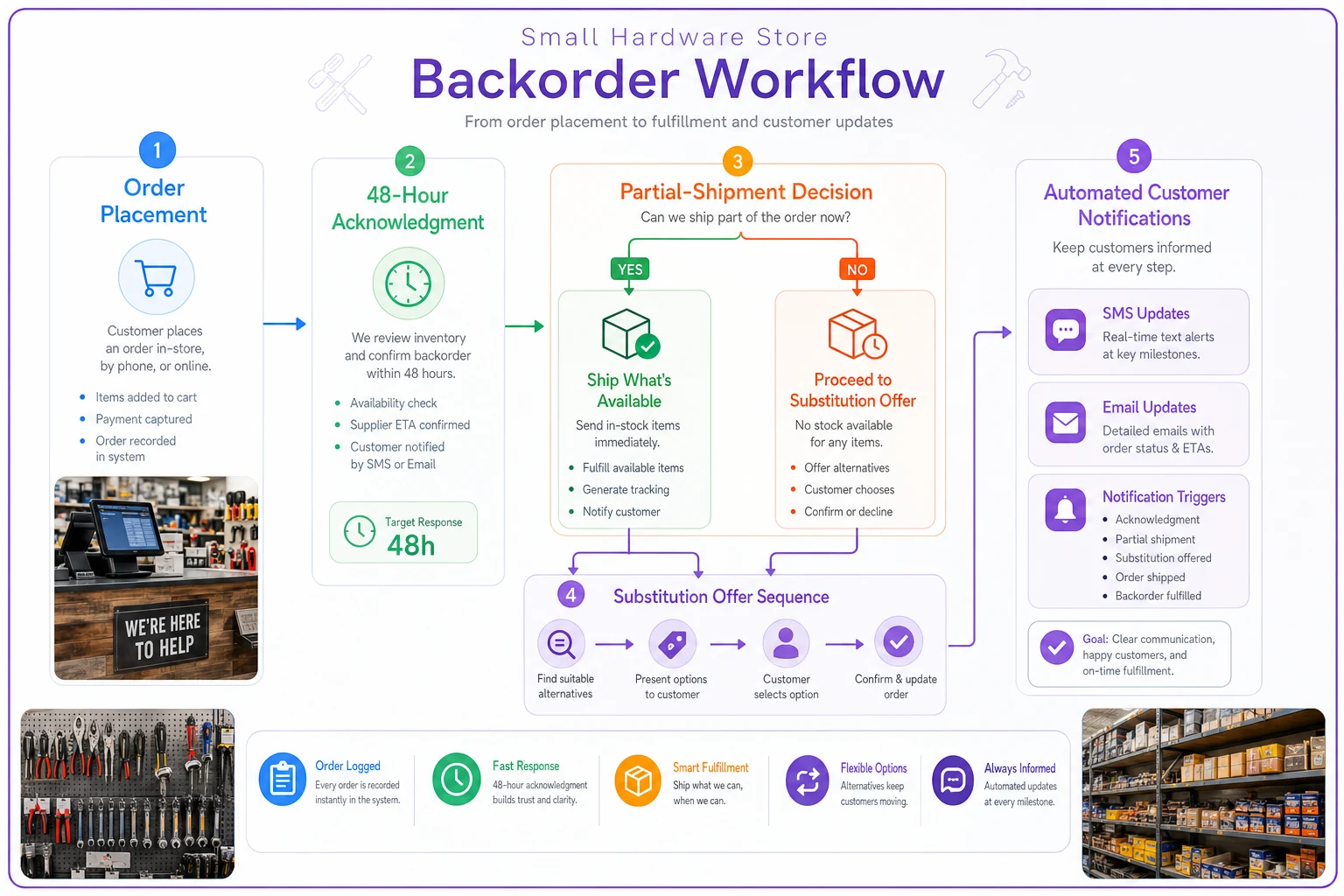
A simple flowchart like this helps staff visualize the automated touchpoints.
Building customer expectation scripts that prevent frustration
Generic "your order is delayed" messages create more problems than they solve. Hardware customers need specific information because they're often planning projects around deliveries. Effective scripts address three core anxieties:
Timeline anxiety: When exactly will items arrive? Vague promises like "soon" or "next week" increase stress. Better: "Expected Tuesday, September 12, delivered to store by 2 PM."
Completeness anxiety: Will everything arrive together? Customers ordering multiple items for one project need to know upfront if they'll be receiving partial shipments.
Alternative anxiety: Are there other options? Some customers can't wait, others prefer to hold out for exactly what they ordered. Present alternatives neutrally.
A working script template:
"Hi [Name], Update on order #[Number]:
Status: [X items] ready for pickup now, [Y items] arriving [specific date]
What's ready now:
-
[List items]
What's coming [date]:
-
[List items with arrival times]
Your options:
-
Pick up available items now, rest when ready
-
Wait for complete order (all ready by [date])
-
Consider these in-stock alternatives
[list if applicable]
Reply with 1, 2, or 3, or call us at [number] with questions.
The timing rules that reduce daily firefighting
Random backorder communication creates operational chaos. Employees constantly interrupt what they're doing to handle order questions. Customers call repeatedly for updates. The solution isn't faster response—it's predictable timing.
Establish fixed communication windows:
-
Morning batch
9 AM status updates for all pending orders
-
Afternoon batch
3 PM shipping notifications and arrival updates
-
Evening batch
6 PM next-day pickup reminders
Between these windows, avoid ad-hoc updates unless something is genuinely urgent. This seems counterintuitive—wouldn't customers want to know the moment their items arrive? But predictable timing actually reduces anxiety more than speed does. Customers learn when to expect updates and stop calling constantly for status checks.
Batch communications into set windows to reduce context-switching and free up focused staff time.
Staff productivity improves significantly when they're not constantly context-switching between tasks and customer communication. A typical three-person hardware store team saves 8–12 hours weekly just by batching communications into set windows.
Real operational breakdown: Coleman Hardware's backorder transformation
Coleman Hardware in Ohio was struggling with backorders damaging customer relationships. They averaged 70–80 backorders monthly, with about 25% ending in cancellations or complaints. The owner spent hours every week personally calling customers and still couldn't keep everyone informed.
They made three changes.
First, they created a simple decision tree for partial shipments. Orders under $50 always shipped complete. Orders over $200 shipped whatever was available unless the customer specified otherwise. Orders between $50–200 followed category rules—mixed categories shipped partial, same category held together.
Second, they set up automated SMS updates using their existing POS system's API. Templated messages at order placement, 48 hours, and shipment. Setup took about three hours.
Third, they trained staff on one substitution script. No more making different offers depending on who was working. Every customer got the same neutral presentation of alternatives.
Results after 90 days:
-
Cancellations dropped from around 20 monthly to 6–8
-
Customer complaints about backorders down roughly 70%
-
Staff time on backorder management reduced from 20+ hours weekly to about 6
-
Customers started spending more per order, likely because trust in the store increased
The owner's observation was simple: automation didn't eliminate backorder challenges, it made them predictable. Instead of daily crisis management, they were handling exceptions within a structured system.
Tools and operational software that handle the heavy lifting
Manual tracking inevitably fails as order volume grows. Even disciplined teams struggle to maintain consistent communication when managing dozens of concurrent backorders. This is where AI-powered operational software genuinely earns its place—not as a luxury, but as a practical tool for keeping things from falling through the cracks.
Modern platforms connect your POS data with automated communication tools. When inventory arrives, customers get notified automatically. When items stay backordered past a threshold date, escalation workflows kick in. The software also starts surfacing patterns over time—which suppliers consistently run late, which products frequently need substitutes, which customers prefer partial shipments.
The key is choosing tools that work with your existing systems rather than requiring you to rebuild everything from scratch. A solid backorder management platform should:
-
Pull order data from your current POS
-
Send automated updates via SMS and email
-
Track customer preferences for future orders
-
Generate reports showing backorder patterns
-
Handle partial shipment logistics automatically
A lot of hardware store owners resist automation because they worry about losing the personal touch. But operational software actually enables better personal service by handling routine communications—freeing staff to focus on the customers and conversations that actually need their attention.
When automation makes sense versus when it doesn't
Not every hardware store needs full backorder automation. Stores doing under $500K annually with fewer than 20 backorders monthly might manage fine with a disciplined manual process. The investment in automation—both financial and in setup time—might not generate enough return to justify it.
Automation becomes critical when:
-
Backorders exceed 40–50 monthly
-
Multiple staff members handle customer communications
-
You stock products from 10+ suppliers with varying lead times
-
Customer projects depend on complete order fulfillment
-
You're losing trackable revenue from cancellations
Automation becomes problematic when:
-
Your customer base is very small and expects personal phone calls
-
You primarily sell custom-ordered items that require detailed discussion
-
Your POS system can't export data or connect with other tools
-
One person already successfully manages all customer communication
The decision really comes down to whether backorder management is constraining your operation. If staff spends more time tracking orders than serving customers, if cancellations are creeping up, or if complaints about communication are common, automation pays for itself faster than most owners expect.
Measuring success beyond reduced cancellations
Most stores track cancellation rates and complaint volume. But good backorder management improves operations in ways that take longer to notice and compound over time.
Customer lifetime value increases when buyers trust your communication. They're willing to place larger orders knowing you'll handle complications professionally. They're more patient with delays when updates arrive on a predictable schedule. They recommend your store because you "have your act together" compared to whoever they used before.
Staff morale improves when they're not constantly apologizing for communication failures. Counter workers can actually help customers choose products rather than spending shifts tracking down order statuses. Receiving staff can process shipments without worrying about who needs to be notified.
Inventory turns also accelerate when partial shipment rules are clear. Products don't sit waiting for complete orders to be ready. Cash flow improves as a result.
Track these metrics alongside the obvious ones:
-
Time between order placement and first customer contact
-
Percentage of orders requiring manual intervention
-
Average customer contacts per backorder
-
Staff hours spent on backorder management
-
Customer reorder rate after backorder experiences
Improvements across these areas indicate something systemic is working better, not just better complaint handling.
Moving from reactive scrambling to proactive customer satisfaction
The path from backorder chaos to systematic management doesn't require a complete overhaul. Start with one pattern—maybe the 48-hour acknowledgment rule. Run it consistently for 30 days. Measure what changes. Then add another element.
Most hardware stores can meaningfully transform their backorder operations within 90–120 days. Clear decision trees, timed communications, and consistent scripting eliminate most of the friction. Add operational software to automate the repetitive parts, and backorders shift from a daily crisis into a minor operational consideration.
The real payoff isn't just fewer complaints. It's the mental space you get back when you're not constantly worried about forgotten customers and angry contractors calling in. It's the ability to think about growing the business instead of managing problems that shouldn't exist in the first place.
Every hardware store faces backorders. The difference between the ones that thrive and the ones that struggle isn't avoiding them—it's handling them smoothly enough that customers barely notice the complexity behind the scenes.
The stores that implement these patterns consistently report the same thing: customers who experienced a well-handled backorder become some of their most loyal buyers. They've seen professionalism during a complication. They trust the store to handle the next one. That trust is worth more than any advertising budget.
Start with the simplest pattern that addresses your biggest pain point. The rest tends to follow from there.
Ready to elevate your hardware store management?
Join 500+ hardware stores using Hardzly to boost operational efficiency, reduce stockouts, and grow revenue.