


Your click-and-collect system probably started simple enough. Customer orders online, you grab the items off the shelf, they pick it up. What could go wrong?
Why click-and-collect quietly falls apart at hardware stores
Everything, apparently.
Running curbside pickup at a hardware store hits different when you're juggling 47 SKUs of wood screws, three people covering counter and pickups at the same time, and customers who ordered "galvanized bolts" but actually meant stainless steel hex heads. Throw in a weekend contractor rush and you've got a mess that bleeds money through refunds, restock labor, and angry reviews.
The core problem isn't technology or headcount. It's the absence of clear operational boundaries — who does what, when, and what happens when things go sideways. Most hardware stores stumble into click-and-collect without any real structure, and it works fine until it doesn't.
Why hardware stores uniquely struggle with pickup workflows
Hardware retail creates specific pickup complications that grocery or general retail doesn't face. A bag of 3/8" washers looks identical to 5/16" washers from three feet away. Customers order "2x4 lumber" without specifying treated versus untreated, assuming you'll figure out what they're building. Paint orders come through as "white" when you've got 26 variations of white on your shelves.
Stop losing sales due to inventory gaps.
Hardzly helps you manage stock levels, orders, and supplier interactions efficiently.
- Unified inventory and sales tracking
- Supplier and purchase order management
- Automated workflow and task scheduling
No credit card required
The SKU density problem compounds everything else. A grocery store might carry 15 types of pasta sauce, all clearly differentiated by brand and label. You've got 200 types of fasteners that require actual product knowledge to distinguish. Your part-timer who normally runs register suddenly needs to know the difference between grade 5 and grade 8 bolts just to pull an order correctly.
Then there's the physical side. Half your orders include items from opposite ends of the store — plumbing fittings from aisle 3, electrical supplies from aisle 9, a bag of concrete from the outdoor yard. A single order might require accessing the locked spray paint cage, cutting chain to length, and loading 50-pound bags into a staging area.
The counter disruption makes everything worse. Your most experienced person gets pulled into helping a contractor pick the right adhesive while three pickup customers are texting that they've arrived. Order status lives in someone's head or on sticky notes that disappear between shifts.
The cascade effect of undefined pickup boundaries
Without clear operational rules, small mistakes stack up fast. Someone pulls an order but doesn't mark it as ready, so the customer gets told it's still being prepared. Another employee re-pulls the same order, doubling the labor. Items land on the wrong shelf and you're doing a frantic search while someone waits in the parking lot.
Inventory accuracy becomes critical here. You show 12 units of 3" deck screws in stock, but 8 are already allocated to pickup orders that haven't been pulled yet. A walk-in customer buys out the shelf, and now you're calling three people to explain their orders can't be fulfilled. Reconciling what's ordered, what's pulled, and what's actually on hand becomes a full-time job nobody has time for.
Staff confusion creates customer-facing failures. A newer employee tells someone their order is ready because they spotted a bag with their name on it — not realizing it's only partially fulfilled. The customer drives 20 minutes to find half their order missing.
These gaps hurt most during contractor hours — that 6–8 AM window when pros need to grab supplies and go. When their 100-count of #10 screws turns out to be #8s, or their treated lumber is actually untreated, you've just cost them hours on a job. They won't complain loudly. They'll just quietly take their business elsewhere.
Building order acceptance rules that actually work
Order acceptance needs hard boundaries, not suggestions. Start with timing: orders placed before 2 PM are available same-day, orders after 2 PM are next-day. No exceptions, no "we'll try to squeeze it in." That cutoff gives your team a clear window for pulling afternoon orders without scrambling at the end of the day.
Create SKU-specific rules for problematic categories:
-
Lumber and building materials
24-hour minimum notice
-
Special-order or low-stock items
48-hour hold for confirmation
-
Paint mixing
next-day only
-
Cut materials (chain, rope, wire)
4-hour minimum
Your order confirmation process should force specificity on ambiguous items. Don't accept "2x4x8' lumber" — require "2x4x8' pressure treated" or "2x4x8' douglas fir." Keep a short list of items that always need clarification: bolt grades, interior vs. exterior products, specific paint codes instead of just color names.
Set quantity limits on fast-moving items during peak seasons. Orders over 10 units of any SKU require 24-hour notice. Orders over $300 require phone confirmation. This prevents your entire fertilizer stock from being locked in unpulled orders while walk-in customers stare at empty shelves.
The verification step matters more than most stores think. Every order over $100 gets a quick confirmation text: "We have your order for 5 gallons of Behr exterior paint in Swiss Coffee. If this is incorrect, call us within 2 hours." That ten-second step eliminates most wrong-item pickups before they happen.
Pick-pack checklist that prevents most errors
The pick process needs to be tight — not because you're Amazon, but because you can't absorb the labor cost of fixing mistakes. Use a physical checklist, a printed sheet or laminated card that travels with each order.
Pre-pick verification:
-
Check inventory levels for all items before starting
-
Note any items requiring special handling (cutting, mixing, locked storage)
-
Identify substitution needs and get approval before pulling
-
Print or write customer name and order number on hold tag
During pick:
-
Initial each line item as pulled
-
Double-check SKUs against the order — read the full product code, not just the description
-
Count quantities twice for orders over 5 items
-
Segregate items needing counter verification (spray paint, ammunition, chain saw)
Pack and stage:
-
Bag small items with receipt or packing slip visible
-
Tag everything with customer name and pickup code
-
Group multi-bag orders with rubber bands or in a box
-
Place in the designated shelf spot and record the location
Final verification:
-
Different person checks the first 10 orders from any new employee
-
Random spot-check 1 in 10 orders for experienced staff
-
Manager verifies all orders over $200
-
Photo of staged order for high-value items
The checklist stays with the order through to the hold area. When customers arrive, you can see who pulled it, when, and whether it got verified. That paper trail stops the finger-pointing when something goes wrong.
Hold shelf turnaround SLAs that keep inventory moving
Your hold area is prime real estate. It can't become long-term storage. Set firm SLAs and actually enforce them.
| Order Type | Hold Duration | Action at Expiry |
|---|---|---|
| Orders under $50 | 48 hours | Restock and refund |
| Orders over $50 | 72 hours | Restock and refund, minus handling fee |
| Special orders with deposit | 7 days | Restock, deposit retained |
The warning system needs real teeth. At 24 hours: automated text reminder. At 36 hours: phone call attempt. At 48 hours: "order will be restocked tomorrow" warning. At 72 hours: restock and refund, minus a handling fee that should be clearly stated in your terms upfront.
Use a color-tag system on the hold shelves:
-
Green
picked today
-
Yellow
picked yesterday
-
Orange
48+ hours old
-
Red
restock immediately
Every morning, someone spends five minutes pulling red tags and initiating restocks. Keeps abandoned orders from piling up and tying down inventory.
For high-value or special orders, require a deposit at checkout. Even $5 dramatically cuts abandonment. Make it non-refundable but applicable to future purchases — this protects you without alienating good customers.
Even $5 dramatically cuts abandonment.
Track hold patterns over time. Some people habitually place orders to "reserve" items with no real intention of picking up. After two abandoned orders, require full prepayment going forward. It sounds strict, but it's completely fair, and it protects everyone else's experience.
Staff role splits that eliminate counter chaos
The biggest curbside workflow failure in hardware stores is trying to have everyone do everything. Counter staff shouldn't be running orders between customers. Defined roles during peak hours are what keep the whole thing from falling apart.
Morning setup (6–8 AM):
-
Puller
Focuses only on contractor pickup orders placed the night before
-
Counter
Handles walk-ins and phone calls only
-
Runner
Delivers pulled orders to vehicles, handles quick grabs
Mid-day rotation (10 AM–2 PM):
-
Primary puller
Works through the afternoon pickup queue
-
Backup puller/counter
Helps customers but breaks away for larger orders
-
Coordinator
Manages hold area, handles customer texts and calls about order status
Evening wind-down (5–7 PM):
-
Counter focus
Everyone on customer service
-
Quick-pull only
Orders with 3 items or fewer
-
Next-day staging
Prep high-priority orders for morning
The key is preventing role confusion. Use physical signals — different colored aprons or vests for pullers versus counter staff. Customers catch on quickly that the person in the blue vest is pulling orders and shouldn't be interrupted.
During solo coverage (lunch breaks, slow periods), switch to "pickup pause" mode. Orders can still be placed but won't be pulled until designated times. A sign at the counter and an auto-response on your pickup system sets the expectation clearly: "Orders placed between 12–1 PM will be pulled starting at 1 PM."
Converting manual chaos to systematic workflows
The paper-and-memory system most stores use starts falling apart somewhere around 10 orders a day. But you don't need enterprise software to fix it.
A shared spreadsheet tracking order status — received, pulling, ready, picked up, abandoned — gets you surprisingly far. Every order gets logged with a timestamp, puller initials, and shelf location. That becomes your source of truth when customers call about their order. The visibility alone tends to cut duplicate pulling and lost orders.
Build template responses for common situations. "Your order is ready" doesn't need a custom message every time. Create standard texts for: order ready, missing items, clarification needed, abandonment warning. Speeds up communication and keeps things consistent no matter who's working.
The daily operations playbook you might already use can absorb pickup workflows into existing routines. Assign 15-minute blocks for pulling orders, checking hold shelf status, and restocking abandoned items. Pickup tasks stop taking over your whole day, but they actually get done.
A basic pickup workflow looks something like this:
-
Order received
-
Inventory check
-
Confirm/clarify with customer
-
Pick and tag
-
Stage on hold shelf
-
Notify customer
-
Pickup or restock at SLA
Here's a simple visual of that workflow.
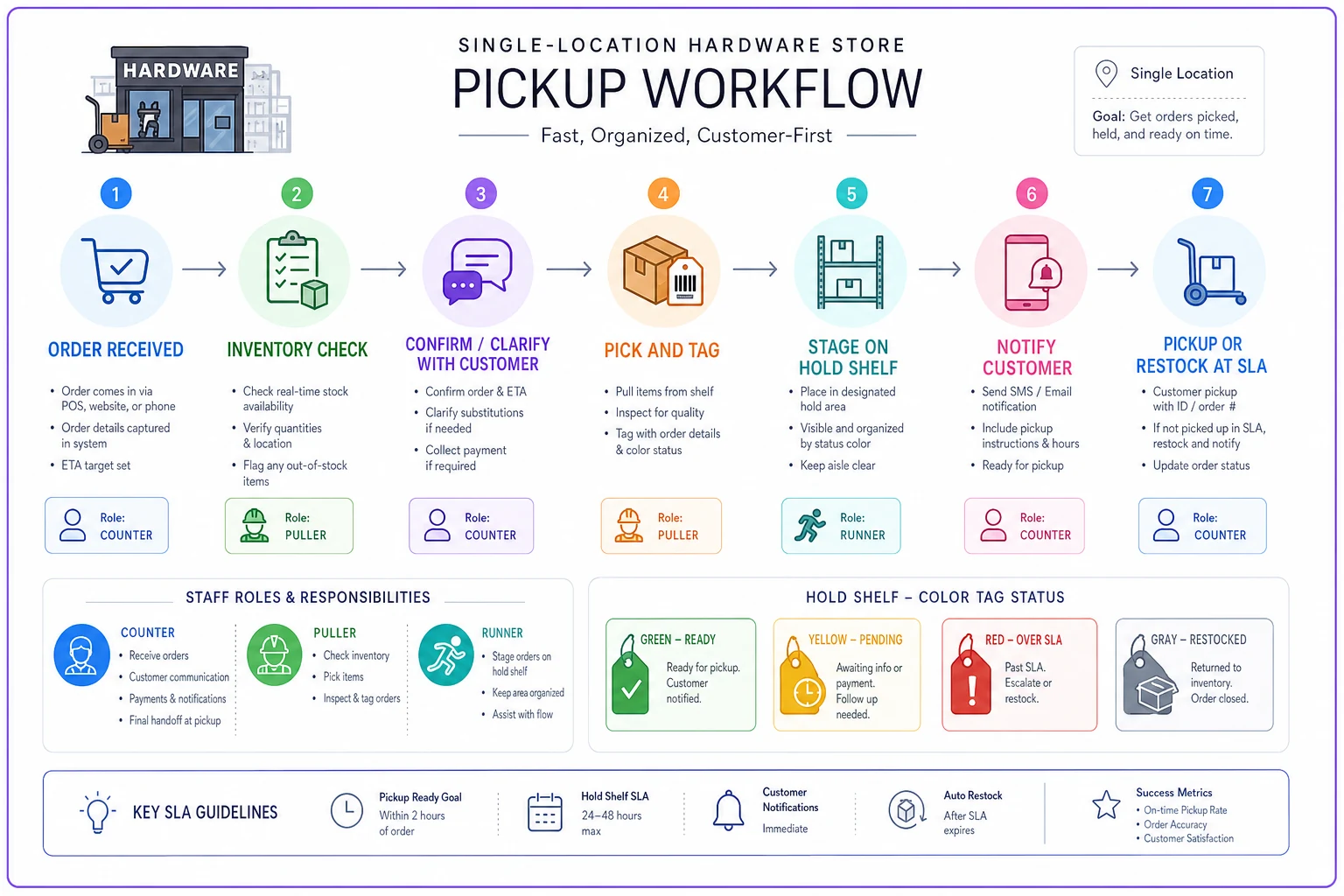
Getting that sequence written down and posted somewhere visible does more than most stores expect. When everyone agrees on the steps, the gaps shrink on their own.
Measuring what matters in pickup operations
Track three metrics weekly: pull accuracy (correct items pulled first attempt), abandonment rate (orders never picked up), and time-to-ready (order placement to ready notification). These tell you whether your process is actually working.
Pull accuracy below 85% means your pick process needs attention — usually better SKU verification or more training on specific categories. Abandonment over 15% suggests hold times are too long or you're accepting orders from habitual no-shows. Time-to-ready over 4 hours for standard orders points to capacity problems or inefficient pick routes.
| Metric | Healthy Range | Warning Sign | Likely Cause |
|---|---|---|---|
| Pull accuracy | 90%+ | Below 85% | SKU verification gaps or training |
| Abandonment rate | Under 10% | Over 15% | Long hold times or habitual no-shows |
| Time-to-ready | Under 2 hours | Over 4 hours | Capacity or routing issues |
| Cost per order | Under $4 | Over $6 | Labor inefficiency |
Cost per order matters more than most stores bother to calculate. Factor in labor time for pulling, holding costs from tied-up inventory, and processing abandoned orders. Most stores find their "free" pickup service actually costs somewhere between $3 and $5 per order in labor. That data helps you decide whether to add fees, set minimums, or restrict certain categories.
Also worth tracking: whether pickup customers shop more frequently or spend more per transaction. Good pickup service often turns occasional customers into regulars — especially contractors who care a lot about their time.
The technology question nobody wants to ask
At some point, manual systems hit a wall. When you're handling 30+ pickup orders daily, spreadsheets and sticky notes start creating more problems than they solve. That's where operational software stops being optional.
Modern AI-powered platforms can automate the entire pickup workflow — from order acceptance through customer notification. The automation handles inventory allocation, flags substitutions for out-of-stock items, and routes picking tasks based on store layout and staff availability. These systems can also flag orders likely to be abandoned based on customer history, which is genuinely useful when you're trying to manage hold space.
The tighter integration between pickup workflows and inventory management is where things really pay off. Instead of manually checking stock before every pull, the system prevents overselling automatically and surfaces alternatives when something's unavailable. When connected to your POS, every pickup updates inventory counts without anyone touching a spreadsheet.
For stores handling complex multi-step orders — cutting materials, mixing paint, loading heavy bags — workflow automation makes sure nothing slips through the cracks. The backorder and partial shipment handling systems work similarly for pickup operations, automatically notifying customers when part of their order is ready while the rest is being prepared.
Making pickup profitable, not just convenient
Without operational discipline, click-and-collect becomes a money-losing convenience that customers expect but won't pay for. The SOP here isn't about perfection — it's about enough structure to prevent chaos while staying flexible enough for a small team.
Start with the basics: clear acceptance rules and timing cutoffs. Add the pick-pack checklist and hold shelf SLAs. Layer in role clarity during peak hours. Those foundational pieces prevent the majority of common problems without requiring new technology or additional headcount.
The measurement and optimization come after. Once basic processes have been running for a month or so, patterns emerge — where things break, where efficiency is being left on the table. Maybe lumber orders need different handling than fasteners. Maybe morning contractor pickups need dedicated resources while afternoon DIY orders can run through standard processes.
The pickup customers who stick around after you implement this kind of structure tend to be your best ones. They respect clear expectations, appreciate reliability, and often spend more overall. The ones who push back on reasonable rules were probably costing you more than they were worth anyway.
Curbside workflow success at a hardware store isn't about matching big-box efficiency. It's about building something sustainable that actually serves your customers without burning out your team or killing your margins. The operational discipline you build for pickups tends to sharpen everything else too — fewer inventory mistakes, more consistent customer service, easier onboarding for new staff. It compounds in ways that are hard to see until you're already on the other side of it.
Curbside workflow success at a hardware store isn't about matching big-box efficiency. It's about building something sustainable that actually serves your customers without burning out your team or killing your margins. The operational discipline you build for pickups tends to sharpen everything else too — fewer inventory mistakes, more consistent customer service, easier onboarding for new staff. It compounds in ways that are hard to see until you're already on the other side of it.
Ready to elevate your hardware store management?
Join 500+ hardware stores using Hardzly to boost operational efficiency, reduce stockouts, and grow revenue.