

If you run a single-location hardware store and you're still stitching together a spreadsheet for inventory, a notebook for reorders, a card terminal that doesn't talk to anything, and sticky notes for staff tasks — this guide is for you. Specifically, it's for owner-operators who want retail ops software for small hardware stores that unifies four things: inventory tracking, supplier/purchase-order management, a basic integrated POS, and simple task scheduling — and keeps working when your internet drops.
What this guide will cover: a tight decision checklist, an evaluation rubric you can actually score vendors against, a comparison matrix of representative solutions, honest mini-reviews, specific recommendations by use case, and a migration/setup checklist with offline-payment FAQs.
What it won't cover: multi-store chains, deep e-commerce platforms, franchise systems, or anything that needs a dedicated IT person to run. If you have three locations and a warehouse, you've outgrown this list.
Worth naming early: "offline-capable" means different things to different vendors, and that gap is where most hardware stores get burned. We'll make that distinction concrete below.
Quick Decision Checklist: Must-Have vs Nice-to-Have
Before you look at a single demo, sort your needs. Too many owners buy on features they'll never touch — and skip the one thing that matters on a Saturday rush when the ISP goes down.
Must-haves for most single-location hardware stores:
-
Inventory with unit-of-measure flexibility (you sell screws by the each, the box, and the pound)
-
Purchase order creation + receiving against the PO (not just "mark as ordered")
-
Reorder point / low-stock alerts tied to real sell-through
-
A POS that writes directly back to inventory — no double entry
-
Some form of offline mode so you can keep ringing sales during an outage
-
Barcode scanning and label printing
-
Simple task assignment (receiving, price changes, shelf resets)
Nice-to-haves (don't pay a premium for these on day one):
-
Customer loyalty / house accounts (useful if you sell to contractors, skip otherwise)
-
Built-in e-commerce
-
Advanced reporting dashboards
-
Rental module (only if you actually rent)
-
Multi-currency, multi-location (irrelevant for you)
Simple rule: if a feature doesn't cut a daily manual step or protect a sale during downtime, it's a nice-to-have.
The Evaluation Rubric
Score each candidate across these seven dimensions. Weight them to your store — a rural shop with flaky internet should weight offline support heavily; a contractor-heavy store should weight PO depth.
Stop losing sales due to inventory gaps.
Hardzly helps you manage stock levels, orders, and supplier interactions efficiently.
- Unified inventory and sales tracking
- Supplier and purchase order management
- Automated workflow and task scheduling
No credit card required
| Dimension | What to look for | Red flag |
|---|---|---|
| Price tier | Transparent monthly band, hardware costs stated | "Call for pricing" with no range |
| Onboarding time | Days to a few weeks for a single location | "Dedicated implementation" measured in months |
| Offline/local support | Fully local server, local caching/offline mode, or cloud-only | Cloud-only with no offline ring-up |
| Inventory & PO depth | UoM handling, PO receiving, reorder logic | PO that's just a glorified note |
| POS integration | Native POS that updates inventory in real time | POS is a separate add-on that syncs nightly |
| Task scheduling | Assign/track simple recurring tasks | No task layer at all |
| Hardware needs | Runs on standard tablets/PCs, printer-agnostic | Proprietary locked hardware only |
The dimension owners underestimate most is offline/local support. There are three real tiers, and vendors blur them on purpose:
-
Fully local server — everything runs on a machine in your store; internet is optional. Most resilient, more to maintain.
-
Local caching / offline mode — primarily cloud, but caches data locally so POS keeps working during outages, then syncs when the connection returns.
-
Cloud-only — dead in the water when the internet is out.
Know which tier you're buying. A vendor saying "we're in the cloud so you never lose data" is not the same as "you can ring up a sale when Comcast is down."
Comparison Matrix: 6 Representative Solutions
These are representative vendor profiles across the categories you'll encounter when shopping. Pricing bands are entry-level ranges for a single terminal and shift around, so treat them as directional, not quotes.
| Vendor type (representative) | Entry monthly band | Setup time | Offline/local support | Supplier/PO features | POS integration | Best-fit use case |
|---|---|---|---|---|---|---|
| Hardware-industry specialist (e.g. Epicor-style) | $$$–$$$$ | 2–6 weeks | Local server option | Deep: PO, receiving, EDI with hardware distributors | Native, real-time | Contractor-heavy stores wanting distributor integration |
| Co-op/distributor-provided system | $$–$$$ | 2–4 weeks | Often local server | Deep, tied to the co-op catalog | Native | Stores buying through a co-op (Ace/True Value-type) |
| General retail POS (e.g. Lightspeed-style) | $$–$$$ | 1–2 weeks | Cloud + local caching offline mode | Solid: PO creation, receiving, reorder points | Native, real-time | Stores wanting modern POS + decent inventory |
| SMB all-in-one (e.g. Square for Retail-style) | $–$$ | Days | Cloud + offline card mode | Basic: PO + receiving, low-stock alerts | Native | Budget-conscious, simpler assortments |
| On-premise legacy POS | $$–$$$ (often license + support) | 2–5 weeks | Fully local | Moderate PO depth | Native | Stores that must run fully offline, no monthly SaaS |
| Modern cloud ops platform | $$–$$$ | 1–3 weeks | Local caching/offline mode | PO creation + receiving, reorder alerts, task scheduling | Native | Stores wanting inventory + POs + tasks in one place |
Price bands: $ = under ~$70/mo · $$ = ~$70–$150/mo · $$$ = ~$150–$300/mo · $$$$ = $300+/mo. Add hardware and payment processing on top.
Mini-Reviews: Honest Pros and Cons for a Single Location
Hardware-industry specialist platforms. Built for the trade — distributor EDI, deep PO workflows, catalog data that saves hours of SKU entry. The catch: they're often priced and scoped for multi-store operations, and onboarding can feel heavy for a one-person back office. If you're not using the distributor integration, you're paying for a tractor to mow a lawn.
Co-op / distributor-provided systems. If you buy through a buying group, their system can genuinely be the best fit — catalog, pricing, and reorder suggestions flow in automatically. Downside: you're somewhat locked into their ecosystem, and switching co-ops later means switching systems. Great while you're in, painful to leave.
General retail POS (Lightspeed-style). Clean modern interface, strong inventory with UoM handling, PO creation and receiving that staff actually understand. Offline mode keeps the register alive during outages — card processing continues, though some back-office features pause. Hardware-specific things like serialized rentals or bulk pricing aren't native, and costs climb as you add modules.
SMB all-in-one (Square-style). Cheapest and fastest to stand up — you can be ringing sales the same afternoon. Offline card mode lets you accept swipes during an outage (more on the caveats in the FAQ). The PO and inventory side is genuinely basic: fine for a tidy assortment, thin once you're managing thousands of fasteners across multiple units. Good starter, outgrown by complex stores.
On-premise legacy POS. The only tier that's truly, fully offline by default — the server lives in your store. For shops with unreliable internet, that's real value. The trade-offs are obvious: you own backups, updates, and the machine; interfaces can feel dated; and support quality varies wildly by reseller.
Modern cloud ops platform. A reasonable middle ground for owners who want inventory, PO receiving, reorder alerts, and task scheduling without enterprise overhead. Local caching keeps the POS working offline and syncs when you're back. The thing to actually verify is PO depth — some are lighter than a hardware store needs, so test receiving against a partial shipment before you commit.
Recommendations by Use Case
Best budget pick: An SMB all-in-one (Square-style). Lowest entry cost, fastest setup, offline card mode included. Buy this if your assortment is manageable and you want to stop double-entering sales into a spreadsheet this week.
Easiest to set up: Same category wins here — days, not weeks, and your staff probably already knows the interface. A general retail POS is a close second if you need more inventory depth but still want a short runway.
Best offline/local support: On-premise legacy POS or a hardware specialist with a local server option. If your internet drops regularly and you can't afford a dead register on a Saturday, nothing beats a server in your back room.
Best for richer PO workflows: Hardware-industry specialist or your co-op's system. Distributor EDI, catalog pricing, and reorder suggestions tied to actual lead times turn purchasing from guesswork into a routine.
If big-box pricing pressure is part of what's pushing you to tighten operations right now, the purchasing discipline matters more than the software brand. We laid out the immediate plays in this breakdown of what to do when big-boxes use tariff refunds to cut prices — worth reading alongside this guide.
When Each Approach Actually Makes Sense (and When It Doesn't)
A fully local server makes sense when your internet is genuinely unreliable, you have someone willing to own backups, and downtime costs you real sales. It's a bad idea if nobody at the store is comfortable running a backup routine — an un-backed-up local server is a single point of catastrophic failure.
Cloud with offline caching makes sense when your internet is mostly fine but you want a safety net, and you'd rather not maintain a server. It's the right default for most stores. It's a poor fit if your connection drops for hours at a stretch daily — caching is designed for outages measured in minutes to a couple hours, not all-day blackouts.
Pure cloud-only should be avoided by almost every hardware store. The one exception: a store with rock-solid redundant internet — two ISPs, or reliable cellular failover. Even then, test it before you trust it.
Who should not buy a hardware-industry enterprise system: a single-register shop with a simple assortment and no distributor EDI needs. You'll pay for complexity you never touch, and onboarding will eat weeks you don't have.
A Real Scenario
A single-location hardware store — roughly 6,000 SKUs, two registers, contractor accounts making up about a third of revenue — was running inventory in a spreadsheet and writing POs by hand off a clipboard walk-through. Reorders were reactive: they noticed empty pegs, not low numbers.
The pain wasn't dramatic, it was constant. Receiving a partial shipment meant re-counting against a paper PO and updating the spreadsheet later — sometimes days later — so on-hand counts were routinely off by enough that staff stopped trusting them. During a two-hour internet outage one weekend, the cloud card terminal left them hand-writing sales, and two got lost.
They moved to a mid-tier general retail POS with offline caching and native PO receiving. Setup took about two weeks, most of it spent cleaning SKU data. The changes weren't magic, but they were real: receiving a partial PO became a scan-and-confirm step instead of a recount, on-hand accuracy got close enough that staff trusted reorder alerts again, and the next outage didn't stop a single sale. They estimated they were recovering somewhere around four to six hours a week previously spent reconciling counts and rewriting POs — time that went back to the floor.
The lesson wasn't "this brand is best." It was that PO receiving and offline continuity were the two features that actually moved the needle — and those were the two they'd nearly skipped while comparing dashboards. That's a pattern worth keeping in mind when you're sitting through demos.
Migration and Setup Checklist
Switching systems fails on dirty data more than on bad software. Clean first, migrate second.
Data to clean before you import:
-
Deduplicate SKUs — same item under multiple numbers is the most common mess
-
Standardize units of measure (each / box / case / pound) and set conversions
-
Verify supplier names and map vendor part numbers to your SKUs
-
Set reorder points on your top-moving items first, not all 6,000 at once
-
Confirm current on-hand counts with a physical count during migration — don't import known-bad numbers
Hardware checklist:
-
Tablet(s) or PC(s) that meet the vendor's spec
-
Barcode scanner (confirm compatibility — wired vs Bluetooth)
-
Receipt printer and label printer (check driver support)
-
Cash drawer
-
Card reader compatible with your chosen processor
-
If local server
the server machine, a UPS battery backup, and an external/offsite backup target
-
Reliable local network; a cellular failover if your ISP is unreliable
Testing offline flows — do this before go-live, not after:
-
Disconnect the internet during a non-busy hour.
-
Ring a cash sale. Confirm it completes and records.
-
Ring a card sale in offline mode. Confirm the behavior and the risk (see FAQ below).
-
Reconnect and confirm the offline transactions sync correctly — no duplicates, no drops.
-
Confirm inventory counts updated from the offline sales.
-
Test a PO receiving with a partial shipment to see how back-orders are handled.
Run through that list at least once before your first real trading day on the new system. It takes an hour and saves a lot of grief.
A quick visual workflow to run the offline testing before go-live.
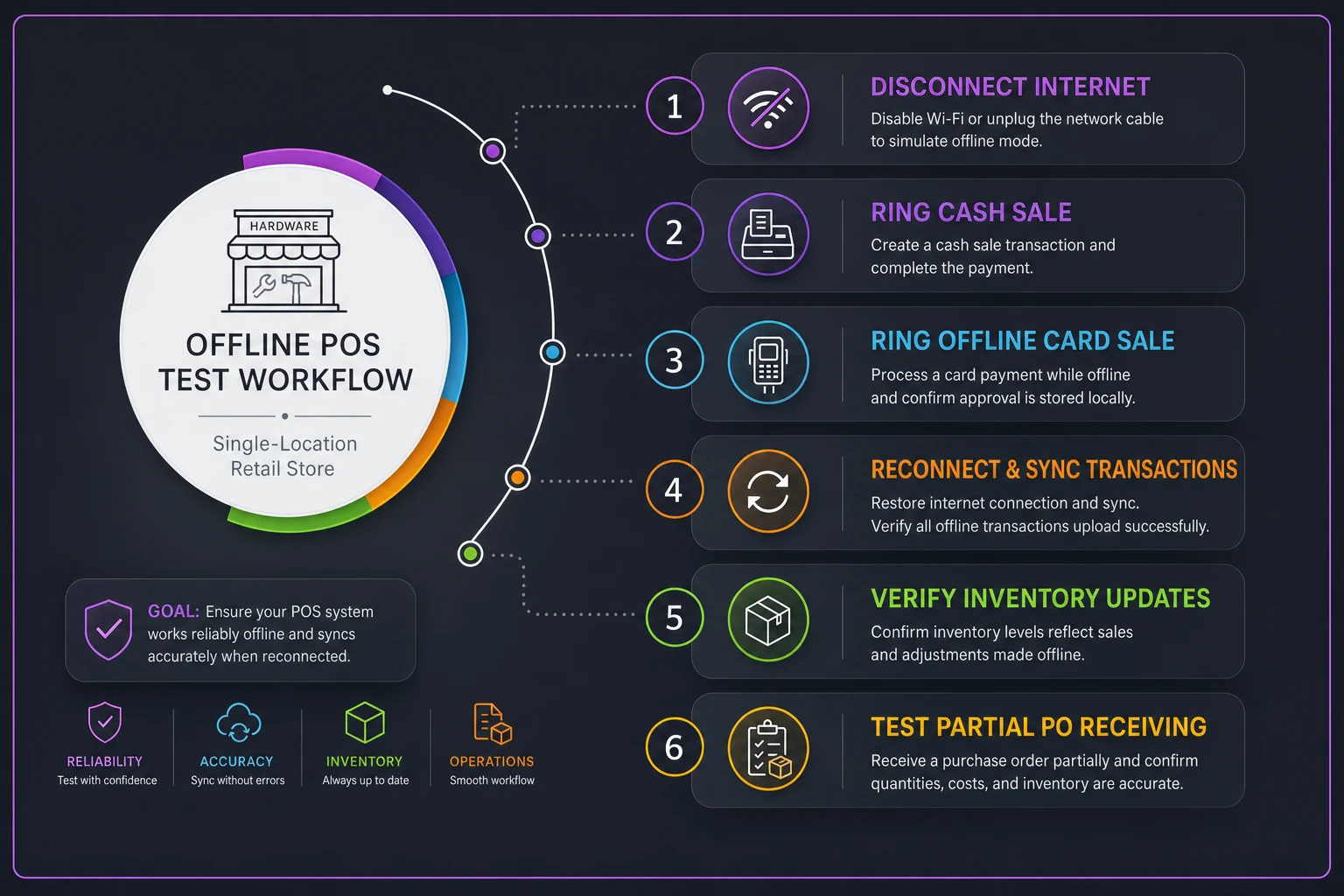
Do the offline sync test after cleaning SKUs so you catch mapping issues before go-live.
Run through that list at least once before your first real trading day on the new system. It takes an hour and saves a lot of grief.
Six Questions to Ask Sales
"When my internet goes down, exactly what still works — ringing cash sales, card sales, inventory lookup? Walk me through it." (Make them demo it, don't take a yes.)
-
"When my internet goes down, exactly what still works — ringing cash sales, card sales, inventory lookup? Walk me through it." (Make them demo it, don't take a yes.)
-
"What's the total monthly cost including payment processing, add-on modules, and support — not just the headline price?"
-
"How does PO receiving handle a partial shipment and a back-order?"
-
"If I leave in two years, how do I export my full inventory, customer, and sales history, and in what format?"
-
"What hardware is locked to you vs. what can I buy off the shelf?"
-
"Who runs backups, how often, and how fast can I recover if the local machine dies?"
"Who runs backups, how often, and how fast can I recover if the local machine dies?"
Pricing Transparency: What's Commonly Extra
The headline monthly number is rarely the real number. Watch for these:
-
Payment processing fees — often the biggest ongoing cost, sometimes bundled, sometimes not
-
Per-register or per-user fees stacked on the base
-
Add-on modules (advanced reporting, loyalty, e-commerce, PO/EDI)
-
Onboarding/implementation fees — one-time but can be steep
-
Hardware — bundles look convenient but are often marked up
-
Support tiers — "premium support" that turns out to be the only responsive tier
-
Data migration charged separately
Ask for an all-in monthly estimate in writing, with processing included at your approximate volume.
FAQ: Offline Payments, Card Processing, and Backups
Can I accept card payments when the internet is down?
Sometimes. Many systems offer an "offline card mode" that stores the card data and processes it once you're reconnected. The risk: you won't know in the moment whether the card will actually clear, so a declined card after the fact is your loss. Set a dollar cap on offline card sales and lean on cash during outages.
What happens to offline sales when the connection comes back?
With local caching done well, queued transactions sync automatically. Your job during testing is to confirm there are no duplicates and no dropped sales — which is exactly why the offline sync test above needs to happen before go-live, not after.
How do I back up a local/on-premise system?
You own it. At minimum: automated daily backups to an external drive and an offsite or cloud copy. A backup sitting next to the server doesn't help if there's a fire or theft. Test a restore at least once so you know it actually works — an untested backup is a hope, not a plan.
Is cloud-only ever safe for a hardware store?
Only with reliable redundant internet, and even then, offline caching is cheap insurance. For most stores, the question isn't "cloud or local" — it's "does my POS keep ringing sales when the connection drops," and the answer should be yes.
Next Steps
Start with the rubric, not the demos. Score two or three vendors that match your offline tier and PO depth needs, ask the six sales questions, and insist on seeing the offline flow demonstrated live. Then clean your SKU and supplier data before you migrate anything — that single step determines whether your new system is trustworthy on day one or a mess you quietly stop using by month three.
The right platform for a single-location hardware store isn't the one with the most features. It's the one that removes double entry, keeps your counts honest, and keeps the register working on a busy Saturday when the internet doesn't. If competitive pressure from the big boxes is part of what's driving this upgrade, pair this buying decision with the tactical moves in when big-boxes use tariff refunds to cut prices so your operations and your pricing response are pulling in the same direction.
The right platform for a single-location hardware store isn't the one with the most features. It's the one that removes double entry, keeps your counts honest, and keeps the register working on a busy Saturday when the internet doesn't. If competitive pressure from the big boxes is part of what's driving this upgrade, pair this buying decision with the tactical moves in when big-boxes use tariff refunds to cut prices so your operations and your pricing response are pulling in the same direction.
Ready to elevate your hardware store management?
Join 500+ hardware stores using Hardzly to boost operational efficiency, reduce stockouts, and grow revenue.