


Your loading dock turns into a parking lot every Tuesday. Three suppliers show up at once, one with a pallet of fertilizer that needs immediate cover from rain, another with plumbing fixtures you have nowhere to stage, and your only employee is stuck helping a customer pick out door hinges while you're trying to verify invoices against purchase orders that are somewhere in the office. This isn't a staffing problem or a space problem. It's a scheduling problem that compounds into everything else.
Why receiving appointments fail at single-location hardware stores
Small hardware stores handle a weird mix of deliveries that big-box stores never deal with. You've got your main distributors like Orgill or Do it Best dropping full pallets twice a week. Local suppliers bringing specialty items in beat-up vans. Direct shipments from manufacturers who give you a four-hour delivery window. Plus the random freight carrier who shows up with that special-order window your customer's been waiting six weeks for.
Most receiving appointment systems are built for stores with actual receiving departments. They assume you have a dock manager, multiple bay doors, and staff whose only job is checking in deliveries. They require suppliers to log into portals, pick time slots, and follow complex protocols that your local lumber guy — who's been delivering to you for fifteen years — will absolutely ignore.
What ends up happening is you coordinate everything through texts and phone calls. Your lumber supplier texts Sunday night about Monday's delivery. You tell him anytime after 10 AM works. He shows up at 10:15 while you're dealing with a contractor who needs sixty feet of copper pipe cut right now. The lumber sits on the dock getting rained on while you scramble to find someone to help unload.
The cross-dock piece makes this worse. When you're trying to move product straight from receiving to the floor — which you have to do because you don't have the space for anything else — timing becomes everything. That fertilizer pallet needs to go directly to the covered area out back. Those plumbing fixtures need to land right next to their shelf location. You can't dump everything in receiving and sort it out later because there is no receiving area, just that twelve-foot strip between the dock door and your fastener aisle.
The two-person reality check
At most single-location hardware stores, you've got maybe two people who can handle receiving at any given time. Usually that's you and whoever else is working that shift. One person verifies the delivery while the other physically moves product.
Stop losing sales due to inventory gaps.
Hardzly helps you manage stock levels, orders, and supplier interactions efficiently.
- Unified inventory and sales tracking
- Supplier and purchase order management
- Automated workflow and task scheduling
No credit card required
Both people need to know:
-
What's coming
-
Where it goes
-
What needs immediate attention
-
What can wait
This breaks down fast when multiple deliveries overlap. Now one person is trying to verify two shipments while the other is moving product from both, nobody knows what goes where, and you've got drivers standing around getting irritated while customers wonder why nobody's at the paint counter.
The appointment system needs to be built around this two-person maximum. Not as an ideal scenario — as the actual constraint.
Building the no-tech appointment framework
Forget apps and portals. You need something that works with a printed calendar, a whiteboard, and the phone numbers you already have.
The weekly grid approach
| Day | 8-10 AM | 10-12 PM | 12-2 PM | 2-4 PM | 4-6 PM |
|---|---|---|---|---|---|
| Monday | BLOCKED | Supplier A | LUNCH | Open | Open |
| Tuesday | Bookkeeping | BLOCKED | LUNCH | Supplier B | Open |
| Wednesday | Open | Supplier C | LUNCH | Open | BLOCKED |
| Thursday | Open | Open | LUNCH | Heavy Window | Heavy Window |
| Friday | Supplier D | Open | LUNCH | Open | BLOCKED |
This isn't trying to optimize every minute. You're creating buffers and protecting time when you know you can't handle deliveries.
Supplier-specific rules
Your big distributors get assigned recurring slots. Every Monday at 10 AM for Orgill. Every Thursday at 2 PM for True Value. These don't change unless there's a holiday or something unusual. The drivers know it, you know it, it becomes routine.
Smaller suppliers work differently. Your local lumber yard doesn't need a formal slot, but they need rules:
-
Never before 10 AM (you're getting the store opened)
-
Never during lunch (you're down to one person)
-
Call morning-of to confirm
-
Maximum 30-minute unload time
Special orders and direct shipments get their own protocol:
-
Afternoon slots only
-
Must provide tracking number in advance
-
Text when 30 minutes out
-
Will be redirected if arriving outside window
A quick visual workflow can help everyone see the simple steps involved.
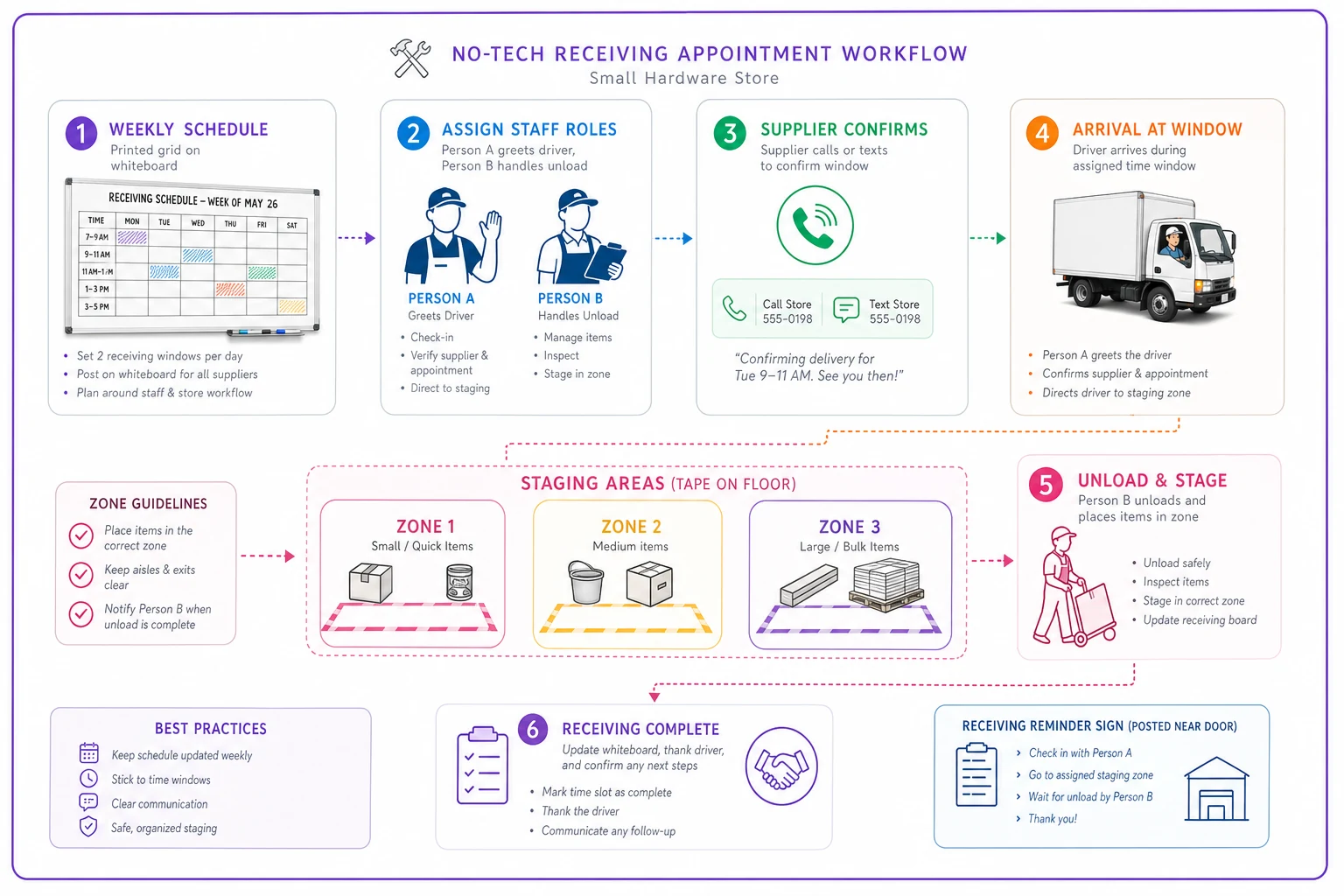
The drivers know it, you know it, it becomes routine.
The receiving checklist that actually works
Most receiving checklists try to cover every possible scenario. Hazmat protocols, temperature monitoring, chain-of-custody documentation. You need something two people can execute while a delivery driver is checking his watch and three more customers just walked in.
The two-person checklist
Person A (Usually you, handling paperwork):
-
Match delivery to expected shipment list (takes 30 seconds if you prepped)
-
Quick count of boxes/pallets against packing slip
-
Flag any obvious damage to driver before signing
-
Sign and get copy
-
Mark priority items for immediate placement
Person B (Moving product):
-
Clear path from dock to destination
-
Stage everything in receiving order — first off truck, first to shelf
-
Separate "immediate placement" from "can wait"
-
Move priority items while Person A finishes paperwork
-
Quick photo of anything damaged
Label one person as paperwork and the other as staging before the truck arrives so roles are clear the moment the driver opens the door.
This takes somewhere between eight and twelve minutes for a typical delivery when both people know their role. Neither person is waiting on the other, and nothing requires both of them at the same time — unless something is genuinely heavy.
Cross-docking without the infrastructure
Real cross-docking requires conveyor systems and proper staging areas. You've got a hand truck and whatever floor space isn't currently occupied by customers. But you can still move product efficiently from truck to shelf if you plan the flow.
The zone approach for small spaces
Divide your receiving area — even if it's just that twelve-foot strip — into three zones:
Zone 1 - Immediate placement: Stuff that goes directly to the floor. Seasonal items during season. Fast movers that are running low. Special orders customers are actively waiting for.
Zone 2 - Same-day placement: Regular stock that needs to hit shelves but can wait until you have a quiet moment. Most regular hardware items land here.
Zone 3 - Backstock or problem items: Overstock. Damaged goods. Items where the count seems off. Anything that requires a decision before it moves.
The physical separation doesn't need to be fancy. Three pieces of tape on the floor. Three different colored tarps. Whatever makes it obvious at a glance where things belong.
During receiving, Person B is sorting into these zones while Person A handles paperwork. After the truck leaves, you both know exactly what needs immediate attention and what can wait until the afternoon slows down.
When suppliers won't follow the rules
Your established suppliers will mostly adapt to whatever system you create because they want to keep your business. It's the random carriers and new suppliers that cause problems.
The enforcement ladder for single-location stores:
First violation: Friendly reminder when they show up outside their window. Still receive the delivery, but explain the schedule clearly.
Second violation: Make them wait if you're genuinely busy. Not to punish them, but to show the schedule actually means something.
Third violation: Start scheduling them for your least convenient times — end of day Friday — until they adjust.
Chronic violators: Find alternative suppliers. If someone can't respect a basic delivery window after multiple conversations, they're costing you more than whatever margin you're making on their products.
Consistency matters here. If you accept deliveries whenever for two months and then suddenly try to enforce windows, nobody will take you seriously. Start with your most cooperative suppliers, get them working smoothly, then gradually add requirements for the others.
Connecting this to your other operations
Your receiving appointment schedule needs to sync with everything else happening in the store — it's not a standalone system.
If you've already built out time-boxed daily operations, your receiving windows should align with those blocks. Don't schedule deliveries during your morning replenishment routine or your end-of-day counting procedures.
For stores dealing with backorder situations, the appointment system becomes even more critical. When that special-order item finally arrives after six weeks, you need to know exactly when it's coming so you can notify the customer right away.
The Monday morning setup routine
Every Monday morning, before the store opens, spend about twelve minutes setting up the week's receiving schedule:
-
Print the week's expected deliveries from your purchasing system (or a handwritten list)
-
Match each delivery to an appointment slot
-
Text or call any suppliers who haven't confirmed their slot
-
Write the final schedule on your dock whiteboard
-
Flag any special handling items — oversized, hazmat, customer waiting
-
Set phone reminders for anything needing special attention
This becomes routine after a few weeks. You're not making complex decisions, just slotting deliveries into predetermined windows and making sure everyone knows when they're coming.
Warning signs your system is breaking
Watch for these patterns — they usually mean something needs adjusting:
-
Drivers regularly waiting more than ten minutes to unload. Your windows are too tight or overlapping.
-
Product sitting in receiving for more than 24 hours. The cross-dock flow isn't working and your zones need a rethink.
-
Surprise deliveries happening more than once a week. Either suppliers aren't taking the schedule seriously or you're not communicating requirements clearly enough.
-
You're constantly apologizing to customers for being stuck at the dock. Delivery windows are eating into prime selling time.
-
The same violations from the same suppliers, repeatedly. They can't or won't follow the system, and something needs to change.
The same violations from the same suppliers, repeatedly. They can't or won't follow the system, and something needs to change.
Making the economics work
A chaotic receiving process costs more than it looks like. Not just in labor hours, but in damaged product from rushed handling, inventory discrepancies from poor checking, and lost sales from being stuck at the dock during busy periods.
A typical single-location hardware store handles somewhere around 250 deliveries per year. If each chaotic delivery burns twenty extra minutes of labor, creates some customer service delays, and produces even one inventory discrepancy, you're looking at a few thousand dollars in hidden annual costs — before counting damaged goods or lost sales.
A working appointment system cuts a lot of that once it's running consistently. Not because it makes receiving faster, but because it eliminates the scramble and confusion that cause errors in the first place.
The simple tech additions that actually help
This system works without technology. But a few basic tools reduce friction without adding complexity.
A shared Google Calendar that suppliers can view (but not edit) shows them available slots without back-and-forth phone calls. You update it, they check it.
A basic group text with your regular drivers lets you broadcast changes quickly. "Running 30 minutes behind on afternoon deliveries" saves four individual calls.
Automated text reminders for special deliveries make sure you don't forget that customer's special-order window arriving Thursday afternoon.
None of this is required. But it helps.
For stores that want to go further, AI-powered operational software can handle a lot of this coordination automatically — scheduling deliveries based on staffing patterns, sending supplier confirmations, flagging potential conflicts before they become problems. That kind of platform can genuinely take routine coordination off your plate. But get the manual system working first. You need to understand your actual patterns before you automate them.
The bottom line on receiving appointments
Your receiving appointment system doesn't need to be complicated. It needs to match your actual operations, work with two people, and be simple enough that suppliers will follow it.
Start with the weekly grid. Assign major suppliers to recurring slots. Set clear rules for everyone else. Build the two-person checklist around how you actually work. Set up three zones for cross-docking without any real infrastructure.
This isn't about optimizing every minute. It's about eliminating the Tuesday morning situation where three trucks show up at once while you're helping customers, verifying invoices, and trying to figure out where to put a pallet of fertilizer in the rain.
Run it consistently for a month before adding anything else. Once suppliers take the schedule seriously and your team has the routine down, you can refine from there. The goal isn't a perfect system — it's never again standing on the dock holding three invoices, watching two trucks wait, while you hear the phone ringing inside and there's nobody to answer it.
Ready to elevate your hardware store management?
Join 500+ hardware stores using Hardzly to boost operational efficiency, reduce stockouts, and grow revenue.