

Most hardware owners don't buy bad software. They buy good software at the wrong time, in the wrong order, with no plan for how it talks to everything else. A year later the counter has four screens, two logins nobody touches, and a receiving process that somehow got slower after the upgrade.
That's not a tooling problem. It's a sequencing and governance problem — the kind that quietly compounds until the day you try to swap your POS and discover three other systems are duct-taped to it.
This is a decision framework, not a buyer's guide. The goal is to give a 1–3 person team a way to decide what to buy, what to delay, and what to reject outright — using rules you can actually enforce yourself without a consultant on retainer.
The real enemy isn't bad software. It's integration debt.
Integration debt is the accumulated cost of every tool you bought that doesn't cleanly share data with the rest of your stack. You rarely feel it on day one. You feel it on month fourteen.
A typical example: a store runs a solid POS. Then they add an online "store-in-stock" listing tool because a rep pitched it well. It doesn't sync automatically, so someone exports a CSV twice a week and uploads it. Fine for a while. Then a rental module comes in with its own inventory count. Now there are three places where "how many of this do we have" can disagree, and nobody owns reconciling them.
The debt isn't the money — it's the manual labor the software created. Every tool that doesn't integrate hands you a new recurring chore, and those chores hit the smallest teams hardest because there's no slack to absorb them.
Worth internalizing: the cost of a tool is its price plus the manual work it generates minus the manual work it removes. A $90/month tool that adds 40 minutes a day of reconciliation is more expensive than a $300/month tool that eliminates it. Most owners only look at the sticker.
If your product and supplier data isn't already living in one trustworthy place, fix that before buying anything new — otherwise every tool you add inherits the mess. A clean owner-run operational reporting backbone is what lets you actually evaluate whether a new tool is pulling from the right numbers.
Why this breaks differently as you grow
At one person, you are the integration. You hold the mismatches in your head. If the POS says 12 and the shelf says 9, you know the website is wrong and you'll fix it when you get a minute.
Stop losing sales due to inventory gaps.
Hardzly helps you manage stock levels, orders, and supplier interactions efficiently.
- Unified inventory and sales tracking
- Supplier and purchase order management
- Automated workflow and task scheduling
No credit card required
At two or three people, that falls apart. The knowledge that used to live in your head has to live in the system, because your part-timer isn't going to guess which number is right. The moment you hire, every ungoverned tool becomes a source of someone else making a confident wrong decision.
This is the scale trap nobody warns you about: tools that work fine as a solo operator actively create errors the moment you add a second set of hands, because the undocumented workarounds only existed in one brain.
The framework below is built around a question most buying guides skip entirely: when a tool fails or disagrees with another tool, who notices, and how fast? On a tiny team, "nobody, for three weeks" is the default answer unless you design against it.
The one-page priority matrix
Before comparing features, score every prospective purchase on two axes: how much it touches your core operations, and how much manual work it removes versus creates. This keeps you from buying shiny edge-case tools before your foundation is solid.
| Category | **Removes manual work (4–5)** | **Neutral (3)** | **Adds manual work (1–2)** |
|---|---|---|---|
| Core operations (POS, inventory, receiving, product data) | Buy first — highest leverage | Negotiate for integration before buying | Reject or demand fixes — this is how debt starts |
| Supporting (pricing, labels, reporting) | Buy second | Buy when core is stable | Delay |
| Edge / nice-to-have (loyalty, niche add-ons) | Buy later | Delay | Hard no, for now |
The single most useful rule here: nothing in the top-right box gets bought, ever, without a written fix. A tool that touches your core and adds manual work is the exact recipe for integration debt. That's the quadrant that produces the four-screens-at-the-counter situation.
A quick way to use this in a sales meeting: if a vendor can't tell you which box their product lands in — and specifically how it removes work rather than just relocating it — that's your answer right there.
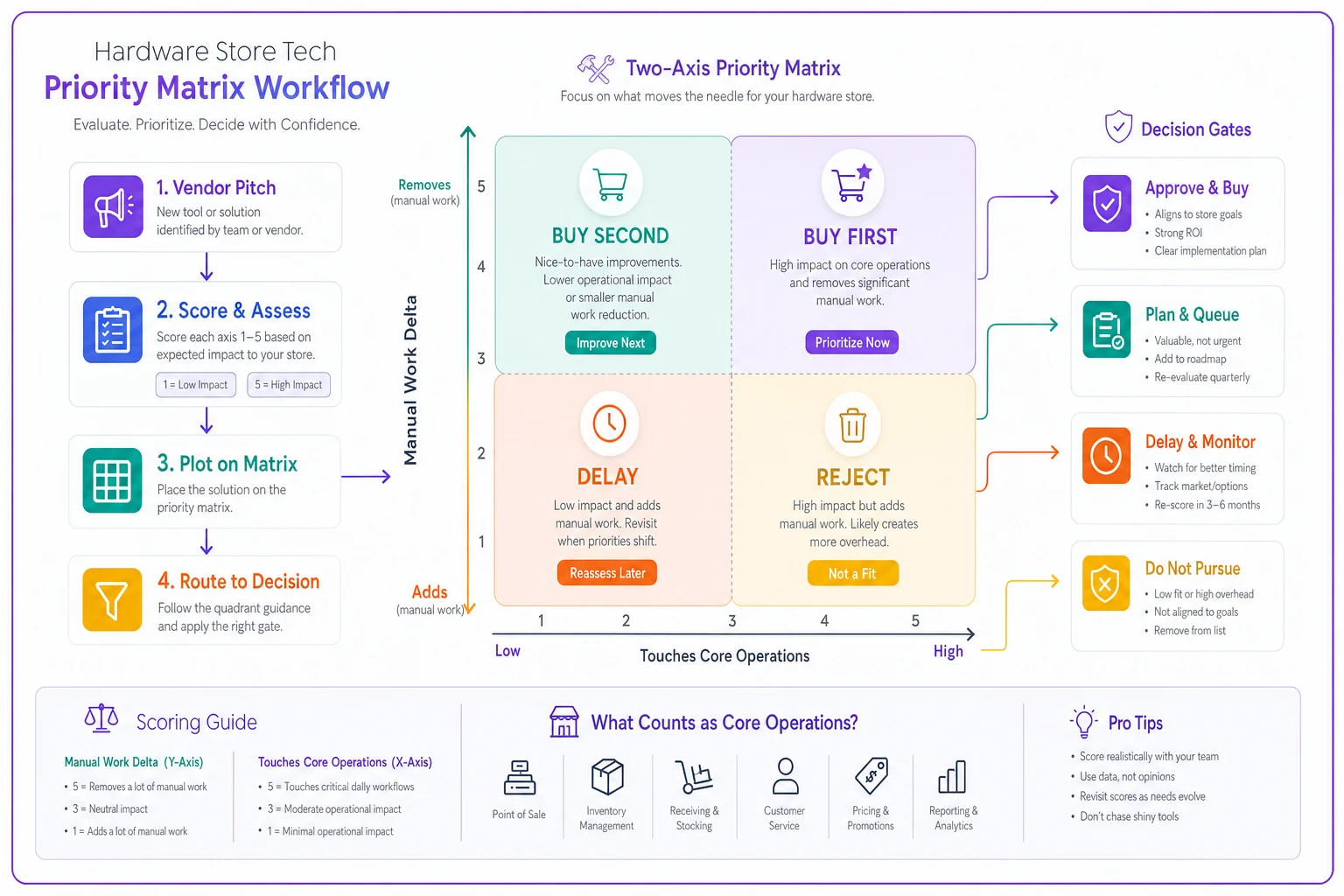
Use this to keep the conversation focused on operational impact instead of features or charm.
The minimal integration checklist
You don't need to audit forty features. For a hardware store, three integration points cause the majority of the pain. Pin a vendor down on these before anything else.
1. Offline behavior
-
Does the POS keep ringing sales offline and sync later, or does it hard-stop?
-
When it reconnects, does it reconcile cleanly or create duplicate transactions?
-
Can you still look up a price or a serial number with no connection?
2. Supplier sync
-
Does it pull supplier catalogs and pricing automatically, or is it a manual import?
-
How does it handle a vendor changing a SKU or pack size?
-
Can it map multiple vendor SKUs to one internal SKU, or will the same nut-and-bolt show up as three separate products?
-
When a cost changes, does your retail price flag for review, or silently stay stale?
3. Label printing
-
Does it print to the hardware you already own, or are you buying a new printer?
-
Can it batch-print shelf labels after a price change automatically, or does someone retype them?
-
Do barcode labels match what the scanner at the counter expects?
Label workflows are the classic hidden-cost item. A pricing tool that's "great" but can't push a label is a tool that just created a new typing job for whoever's working the counter.
Owner-executable governance gates
Governance sounds corporate. For a three-person store it just means: written rules you enforce before money leaves the account, so you're not relying on willpower in the middle of a good sales pitch. Run every purchase through these five gates. Any single failure means stop.
-
The manual-work gate. Write one sentence
"This tool removes and adds ." If the "adds" side is bigger, or you can't fill in the blank, don't buy. This gate alone prevents most integration debt.
-
The single-source gate. Will this become the authority for any piece of data — stock count, price, customer record? If yes, which existing tool loses that authority? Two systems claiming to own the same number is a guaranteed future argument.
-
The failure-visibility gate. When this tool is wrong or down, how would you find out? If the honest answer is "a customer tells us," the tool needs an alert or a manual check built around it before it goes live.
-
The exit gate. Can you get your data out in a usable format, and how long does cancellation take? Test this before signing, not during a breakup.
-
The one-person gate. Can the least technical person on the team run the daily parts of this after a 15-minute walkthrough? Tools that only the owner can operate become single points of failure the week you take vacation.
Try running a recent purchase through the gates retroactively to see where it would have failed — it's a quick sanity check.
Run these gates in order and stop at the first failure. It feels slow. It saves you from the slow-motion version where you discover the problem eighteen months and three dependent tools later.
Red-flag contract checks
Vendors write contracts to protect vendors. For a small team, a few specific clauses cause most of the regret.
-
Auto-renew with a short cancellation window. A 30-day notice on a 12-month auto-renew means you can get locked into another full year by missing an email. Note the renewal date in your calendar the day you sign.
-
Price locked only for year one. Ask directly what the renewal price is. "We'll discuss it then" means it goes up.
-
Integration priced as an add-on. If the thing that makes it useful — API access, POS connector — is a separate paid tier, the real price is higher than quoted. Score it in the matrix at its integrated price.
-
Per-terminal or per-user pricing with no cap. Fine at one register. Painful when you add a service bench and a second counter.
-
Data ownership buried in the TOS. You should own your product, customer, and sales data outright, exportable on demand. If that isn't explicit, assume the worst.
-
Mandatory onboarding fees for features you won't use. Common with enterprise tools pitched down to small stores.
One more that catches people: vendors who won't give you a reference from a store your size. A tool built for 40-location chains will drown a 3-person team in configuration it doesn't need.
When adding a tool actually makes sense
Not every manual process needs software. Sometimes the paper-and-pen version is genuinely fine and cheaper.
-
The manual process is already causing real errors, not just feeling clunky.
-
The task repeats daily or weekly and eats measurable time.
-
Multiple people touch it and need a shared source of truth.
-
The current workaround lives in one person's head.
When it's a bad idea: if you're reaching for software to fix a process you haven't actually defined yet. Software doesn't create a workflow — it hardens whatever workflow you already have. Buy a tool to automate a messy receiving process and you've made the mess faster and harder to change.
Who should hold off entirely: a solo owner whose current system, however ugly, is producing accurate numbers and no customer complaints. "It's a little manual" isn't a reason to add a recurring bill and a new login. Fix the process on paper first; buy the tool once the workflow is stable and you can clearly state what it removes.
A real scenario
A single-location store, owner plus two part-timers, roughly $1.1M in annual sales. Over two years they'd accumulated five subscriptions: POS, a separate online-listing sync, a rental tracker, a standalone label app, and a loyalty add-on nobody could really explain.
The symptom wasn't cost — it was that someone spent close to an hour every morning reconciling stock counts that three systems disagreed on, plus the online listings were wrong often enough that customers started calling ahead to confirm before driving over.
They didn't buy anything new. They ran the existing tools backward through the priority matrix. The loyalty add-on scored in the bottom-right and got cut. The standalone label app failed the single-source gate because it maintained its own price list — labeling moved onto the POS's built-in printing. The online-listing sync failed the failure-visibility gate, so they added a simple twice-weekly mismatch check tied to one actual owner.
After about three months: two fewer subscriptions, the morning reconciliation dropped from close to an hour to maybe 15 minutes, and the "is it actually in stock" phone calls mostly stopped. Nothing dramatic on the P&L — a few hundred dollars a month saved — but the recovered time and the drop in wrong-stock errors mattered more than the cash.
The lesson wasn't that these were bad tools. Several were fine. The problem was they'd been bought one pitch at a time with no gate between the pitch and the purchase.
How the pieces connect
The reason this has to be a system and not a checklist is that store tech decisions compound. Your POS feeds your product data. Your product data feeds your labels, your online listings, your reorder decisions. A bad purchase doesn't stay contained — it leaks manual work and bad numbers into every downstream process that depends on it.
So the order is always the same, regardless of what a rep is pitching this week:
-
Get your core data clean and owned in one place.
-
Only then add tools that read from that core and remove work.
-
Gate every purchase before it enters the stack.
-
Review the whole stack a couple times a year the same way you'd review slow inventory — cut what's adding work, keep what's removing it.
For a one-to-three-person hardware team, the real advantage isn't having the most tools. It's having a small, tight stack where every piece earns its place and nothing quietly hands you a new daily chore. The framework above isn't about buying smarter once — it's about never again signing a contract because someone had a good pitch and you didn't have a rule in your pocket to say no.
For a one-to-three-person hardware team, the real advantage isn't having the most tools. It's having a small, tight stack where every piece earns its place and nothing quietly hands you a new daily chore.
The framework above isn't about buying smarter once — it's about never again signing a contract because someone had a good pitch and you didn't have a rule in your pocket to say no.
Ready to elevate your hardware store management?
Join 500+ hardware stores using Hardzly to boost operational efficiency, reduce stockouts, and grow revenue.