

Most single-location hardware stores don't fail because the owner lacks data. They fail because the data lives in seven different places and nobody has a clear rule for what to do when a number goes red. You've got POS reports, a supplier portal, a spreadsheet for open POs, a shoebox approach to petty cash, and a merchandising plan that exists mostly in your head. Each piece works fine on its own. The trouble is the seams between them.
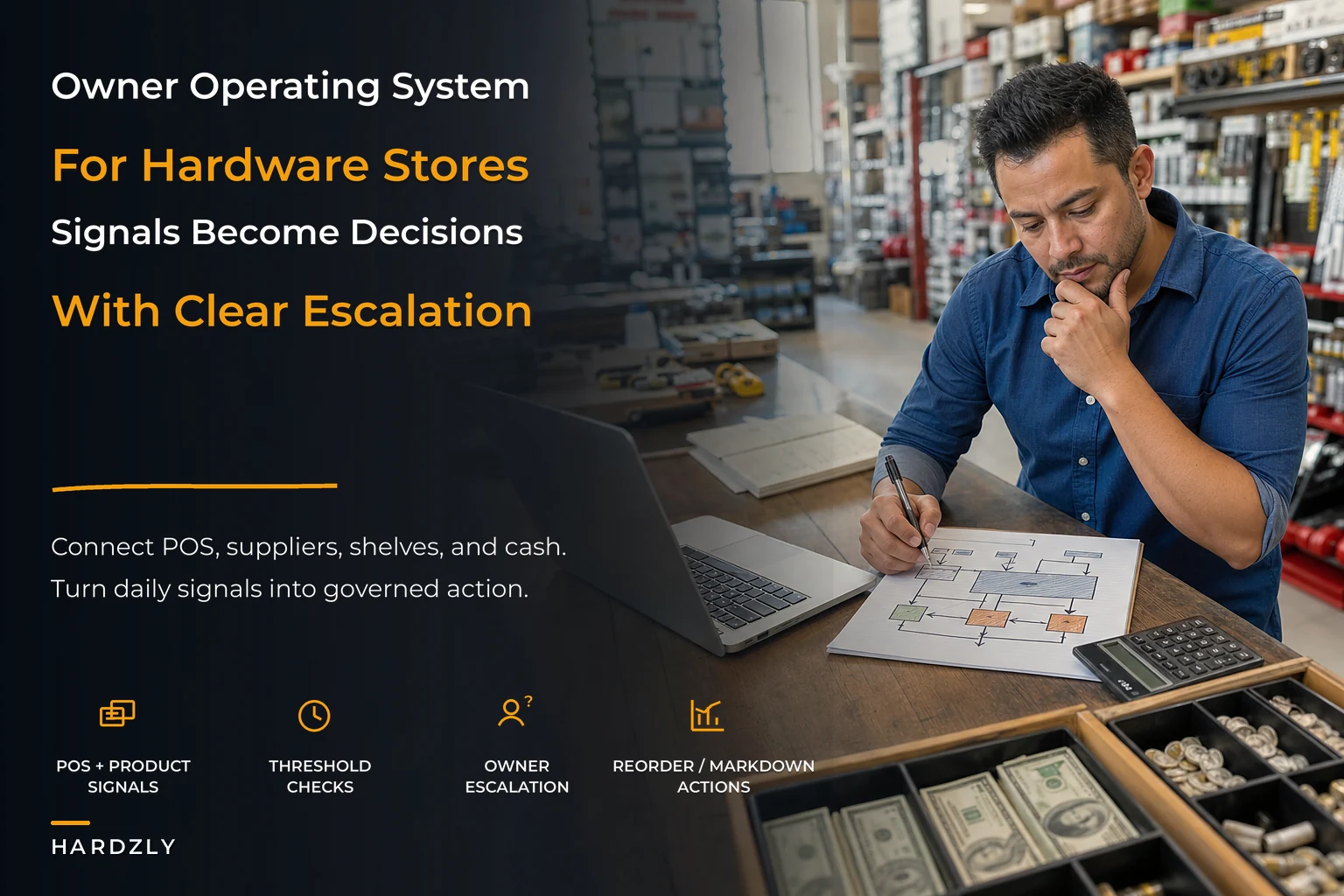
An owner operating system for a hardware store isn't a fancy platform. It's the connective tissue — a defined set of flows that take a signal from one part of the business (say, POS velocity dropping on a top-20 SKU) and route it to a decision (reorder, discount, or hold) with a clear owner and a clear threshold. When that connective tissue is missing, you end up being the integration layer yourself. You're the API between the register and the reorder. That's exactly what breaks the moment you take a day off.
This article is about building that layer deliberately — the dashboard-to-decision flows, the one-page playbook, and a phased rollout that doesn't require you to shut the store down to install it.
Why the seams break before anything else does
There's a pattern that shows up repeatedly in stores doing somewhere between $1.2M and $3M a year. Individually, every system is fine. The POS tracks sales. The supplier sends confirmations. The bank account shows a balance. But nobody has defined what happens between them.
A typical example: paint sales spike for two weeks because a local contractor started a big job. Your POS shows it. But that signal never travels to purchasing until the shelf is empty, because "watch paint velocity" was never a defined trigger — it was just something you'd notice if you happened to look. So you run out, the contractor buys from the big box down the road, and you find out three weeks later when you finally reconcile the category.
The failure isn't the missing paint. It's that there was no flow connecting the sales signal to the reorder decision. Almost always, that's where things go sideways — not inside any single tool, but in the handoff nobody owns.
The second failure mode is the opposite: too many signals, no thresholds. Some owners drown themselves in dashboards. Twelve KPIs on a screen and no rule for which ones actually demand action today versus which ones are just noise. A dashboard without a decision rule attached is just a more stressful way to worry.
An owner OS fixes both by pairing every signal with two things: a threshold (when do I care?) and an escalation gate (who decides, and when does it come to me?).
The four rivers that need to flow into one bed
Think of your store as four rivers that most owners keep completely separate:
Stop losing sales due to inventory gaps.
Hardzly helps you manage stock levels, orders, and supplier interactions efficiently.
- Unified inventory and sales tracking
- Supplier and purchase order management
- Automated workflow and task scheduling
No credit card required
-
POS / sales — what's moving, what's dying, what margin you're actually capturing
-
Suppliers / purchasing — lead times, open POs, MOQs, price changes
-
Merchandising / space — what's on the floor, endcaps, category performance per square foot
-
Cash — payables, receivables, petty cash, the actual dollars behind every decision above
Most stores manage these as four separate jobs, often with four separate mental models. The owner OS forces them to share a riverbed. Nearly every real decision in a hardware store touches at least two of these at once, often all four.
Reordering fast-moving fasteners isn't just a purchasing decision. It's a cash decision (are we tying up $4,000 in inventory that turns in 40 days or 140?), a merchandising decision (do these deserve the shelf space they're taking?), and a POS decision (is velocity trending up or was last month a fluke?). When you treat it as a purchasing-only call, you buy right on volume and wrong on cash.
This is why an owner-run operational reporting backbone matters so much as a foundation. Before you can build decision flows, you need one place where these four rivers actually meet — a single source of truth for POS, product master, and supplier data. Without that, your flows are built on numbers that don't agree with each other, and a flow built on bad data just gets you to the wrong decision faster.
Sample decision flows: signal → threshold → gate → action
The core of the OS is a small library of flows. Each one starts with a signal, applies a threshold, hits an escalation gate, and ends in an action. You don't need dozens. Eight or ten flows cover 80% of recurring decisions in most stores.
Here are a few worth building first.
A quick visual helps show how a signal travels from detection to action.
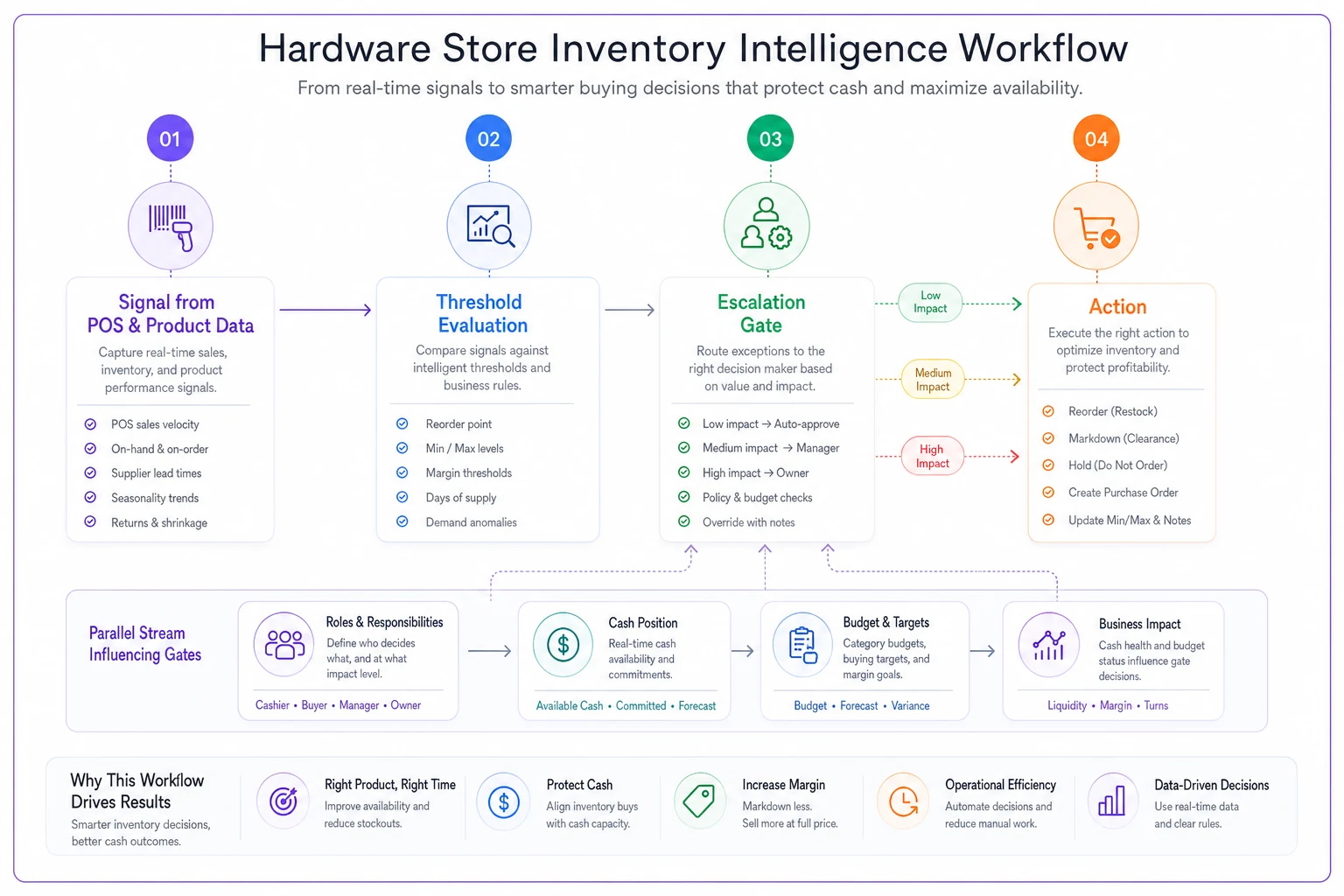
This diagram maps the same four-step shape used in each flow.
Flow 1 — Reorder trigger on a core SKU
-
Signal
On-hand drops below par for a top-100 SKU
-
Threshold
Below par AND velocity flat or rising over trailing 4 weeks
-
Gate
Manager can auto-reorder up to $500 per PO line; anything above escalates to owner
-
Action
PO created, or flagged for owner review
Flow 2 — Margin erosion alert
-
Signal
Realized margin on a category falls more than 3 points below its target band
-
Threshold
Sustained over two weeks, not a single discount event
-
Gate
Owner reviews — is it a supplier cost increase, a mispriced SKU, or too much markdown?
-
Action
Reprice, renegotiate, or accept and document
Flow 3 — Cash runway check before large PO
-
Signal
Any PO above $2,500
-
Threshold
Always — this one has no "small" version
-
Gate
Owner confirms against payables due in the next 21 days
-
Action
Approve, split into two smaller orders, or delay
Flow 4 — Slow-mover disposition
-
Signal
SKU hasn't sold in 90 days and is holding shelf space
-
Threshold
On-hand value above $150
-
Gate
Manager can markdown up to 20%; deeper cuts or returns escalate
-
Action
Markdown, return to vendor, or bundle
The point isn't these exact numbers — yours will differ based on your categories and cash position. The point is the shape: nothing floats around as a vague worry. Every signal has a home, a rule, and a person.
The escalation gate is the piece most owners skip, and it's genuinely the most important one for your sanity. A gate is what lets you delegate without losing control. When your manager knows they can reorder anything under $500 without asking, and you know anything over $500 lands on your desk, you've just bought back several hours a week and reduced the risk of a surprise inventory bill.
The one-page owner playbook
All of this needs to fit on a single page. Not a binder. Not a shared drive nobody opens. One page you could hand to a new manager and say "this is how we run the store."
The one-pager has five parts:
-
The four rivers and who owns each — names, not roles in the abstract
-
The daily and weekly cadence — what gets checked when
-
The active decision flows — the eight to ten flows, in signal→gate→action shorthand
-
The escalation gates — dollar thresholds and who approves what
-
The red-line list — three or four numbers that, if they cross a line, stop everything and come to the owner today
That last one deserves attention. The red-line list is your circuit breaker. Examples: cash-on-hand below a set floor, a single supplier's late shipments causing a stockout on a core category, or realized gross margin for the whole store dropping below a threshold for the month. These aren't "review at the weekly meeting" items — they're "call me now."
A cadence layer sits underneath the playbook. The daily and weekly rhythm — what gets looked at, by whom, and in what order — is where the flows actually get executed. If you don't already have a time-boxed rhythm for tying POS, receiving, and replenishment together, the store operations playbook covers that cadence well and pairs naturally with the decision flows here. The flows tell you what to decide; the cadence tells you when you'll be looking.
Where the cash river changes everything
It's tempting to build the sales and inventory flows first because they're the most visible. But the cash river is what turns a good decision into a survivable one, and it's the one most owners bolt on last.
A store can be growing revenue, moving product, and merchandising well — and still get squeezed to death by timing. Place three big seasonal POs in the same three weeks, your net-30 terms all come due at once, and suddenly a profitable store is uncomfortable making payroll. The inventory decisions were individually correct. The cash coordination was missing.
That's why the cash gates in your flows aren't optional. They're what keeps your purchasing decisions honest. Building real owner cashflow governance into the OS — payables timing, petty-cash controls, a monthly cadence — is what lets you say yes to growth without gambling on it. When cash is a first-class river with its own gates, you stop making purchasing decisions that look smart on the inventory report and reckless on the bank statement.
What actually changes as the store grows
The OS shifts shape depending on where you are. Here's roughly how it evolves.
| Stage | Who runs the flows | Escalation gates | Main risk |
|---|---|---|---|
| Solo owner-operator | Owner does everything | Basically none — you are the gate | Everything lives in your head; one sick day breaks the chain |
| Owner + a couple of key staff | Owner sets flows, staff executes low-value ones | Dollar thresholds start mattering | "Handoffs get fuzzy; 'I thought you ordered it'" |
| Owner + manager + team | Manager runs daily flows, owner runs red-lines | Well-defined gates by dollar and category | Owner drifts back into the weeds without discipline |
The biggest failure point isn't at the small stage or the large stage. It's the messy middle — where you've hired enough people that things can't all live in your head anymore, but you haven't written down the flows yet. That's where stores lose money to duplicated orders, missed reorders, and margin leaks nobody catches. The informal system that worked at stage one silently stopped scaling, and nobody noticed until the numbers slipped.
When this makes sense — and when it doesn't
When it's worth building: You've got at least one other person touching operations, your product master has more than a few hundred active SKUs, or you've had at least one "how did we run out of that?" moment that cost real money. If you can't take a week off without the store's decision-making grinding to a halt, you need this.
When it's a bad idea to over-build: If you're a true solo operator running a small, tight assortment and you genuinely hold it all in your head without errors, don't spend three months building twelve flows you'll never delegate. Build two — the reorder trigger and the cash-runway check — and stop. An OS that's more elaborate than your team is procrastination dressed up as rigor.
Who should not do this yet: Owners whose underlying data is a mess. If your on-hand counts are wildly off and your product master has duplicate and phantom SKUs, building decision flows on top will just automate your bad data. Clean the foundation first, then build the flows.
A real scenario
A single-location store doing a little over $1.8M a year had a recurring problem: they'd stock out on core electrical and plumbing items during their busiest weeks while sitting on roughly $40k of slow-moving seasonal deadstock. The owner was checking POS reports daily but had no rule connecting those reports to purchasing, and the manager didn't feel authorized to reorder without asking first.
They built five decision flows and a one-page playbook. Reorder triggers on the top 100 SKUs with a $600 manager gate. A slow-mover disposition flow that forced a markdown decision at 90 days. A cash-runway check on any PO over $2,500. Nothing exotic.
The change wasn't dramatic overnight. But over about four months, core-category stockouts dropped noticeably — the manager was reordering on a rule instead of waiting for permission — and they cleared roughly two-thirds of the deadstock through timed markdowns instead of letting it sit. The owner's time on daily purchasing decisions fell by around six to eight hours a week. Not because they worked less, but because the low-value decisions finally had a home that wasn't their inbox.
A phased rollout checklist
Phase 1 — Foundation (weeks 1–3)
-
[ ] Get POS, product master, and supplier data agreeing with each other
-
[ ] Verify on-hand accuracy on your top 100 SKUs
-
[ ] Name the owner of each of the four rivers
Phase 2 — First flows (weeks 4–6)
-
[ ] Build the reorder trigger and cash-runway flows only
-
[ ] Set initial dollar gates for your manager
-
[ ] Run them for two weeks and adjust thresholds
Phase 3 — Expand the library (weeks 7–10)
-
[ ] Add margin-erosion and slow-mover disposition flows
-
[ ] Write the one-page playbook
-
[ ] Define your red-line list
Phase 4 — Delegate and harden (weeks 11+)
-
[ ] Hand daily flow execution to your manager
-
[ ] Set a monthly review to tune thresholds
-
[ ] Test it — take three days off and see what breaks
Test the OS by taking three days off to see what breaks.
That last step is the real audit. If the store makes sensible decisions while you're gone, the OS works. If you come back to a pile of "I wasn't sure so I waited," your gates aren't clear enough yet. Fix the gate, not the person.
The point of all of it
An owner operating system isn't about adding more dashboards. It's about making sure every number that matters has a decision attached, a threshold that tells you when to care, and a gate that tells you who decides.
The stores that run smoothly through busy seasons and slow ones aren't the ones with the fanciest reports — they're the ones where the seams between POS, suppliers, merchandising, and cash have been deliberately stitched together. So the owner can step back and the right decisions still get made.
Start with two flows. Get the data honest first. Add gates as you add people. Build it in phases, and let the store prove each phase before you extend it.
Done right, you stop being the integration layer — and start being the person who designed the machine instead of the one holding it together by hand.
Ready to elevate your hardware store management?
Join 500+ hardware stores using Hardzly to boost operational efficiency, reduce stockouts, and grow revenue.