

Most hardware store schedules are built on gut feel and habit. You staff the way you staffed last year, keep two people on Saturday because Saturday "feels busy," and cover Tuesday morning with one person because it always seemed slow. The problem isn't that gut feel is wrong — it's often roughly right — it's that gut feel doesn't tell you when you're bleeding money on idle labor and when you're losing sales because the counter line got too long and a contractor walked out.
For a store running on thin margins with three to six people total, labor is usually your second-biggest controllable cost after inventory. Getting the schedule wrong by even one shift a day adds up fast. This is where forecast driven labor scheduling for a small hardware store stops being a corporate buzzword and becomes a genuinely useful weekly habit — mapping your actual hourly sales pattern to a staffing number, then building a rota around it.
Here's how to build this without needing a spreadsheet degree.
Start with the number that actually matters: sales per labor hour
Before you touch a rota, you need one anchor metric — sales per labor hour (SPLH). It's just your revenue in a given window divided by the labor hours you staffed for it. This is the number that tells you whether an hour was over- or under-staffed.
Most independent stores fall into the same trap: they look at daily totals. Daily totals hide everything. A Wednesday that did $3,100 looks fine on paper. But if $2,200 of that came between 7am–10am (contractors loading up before job sites) and the store crawled from 1pm–4pm, your daily average is lying to you. You were understaffed in the morning and paying two people to restock and stare at the door all afternoon.
The fix is pulling hourly sales, not daily. Nearly every POS can export a sales-by-hour report. If you've already built the habit from the 30-minute POS forecast dashboard, you're halfway there — you just need to slice the same data by hour instead of by day or category.
A workable SPLH target for most single-location hardware stores lands somewhere between $110 and $180 per labor hour, depending on your average basket and whether you run a service counter, rental, or paint desk that ties up staff. Find your own number by looking at hours you know felt correctly staffed, then use that as your baseline.
Build the decision matrix: forecasted hourly sales → staffing level
Once you have four to six weeks of hourly sales data, a shape emerges. Mornings spike, midday sags, there's a small afternoon bump, weekends flatten into steady traffic instead of spikes. That shape is your forecast.
Stop losing sales due to inventory gaps.
Hardzly helps you manage stock levels, orders, and supplier interactions efficiently.
- Unified inventory and sales tracking
- Supplier and purchase order management
- Automated workflow and task scheduling
No credit card required
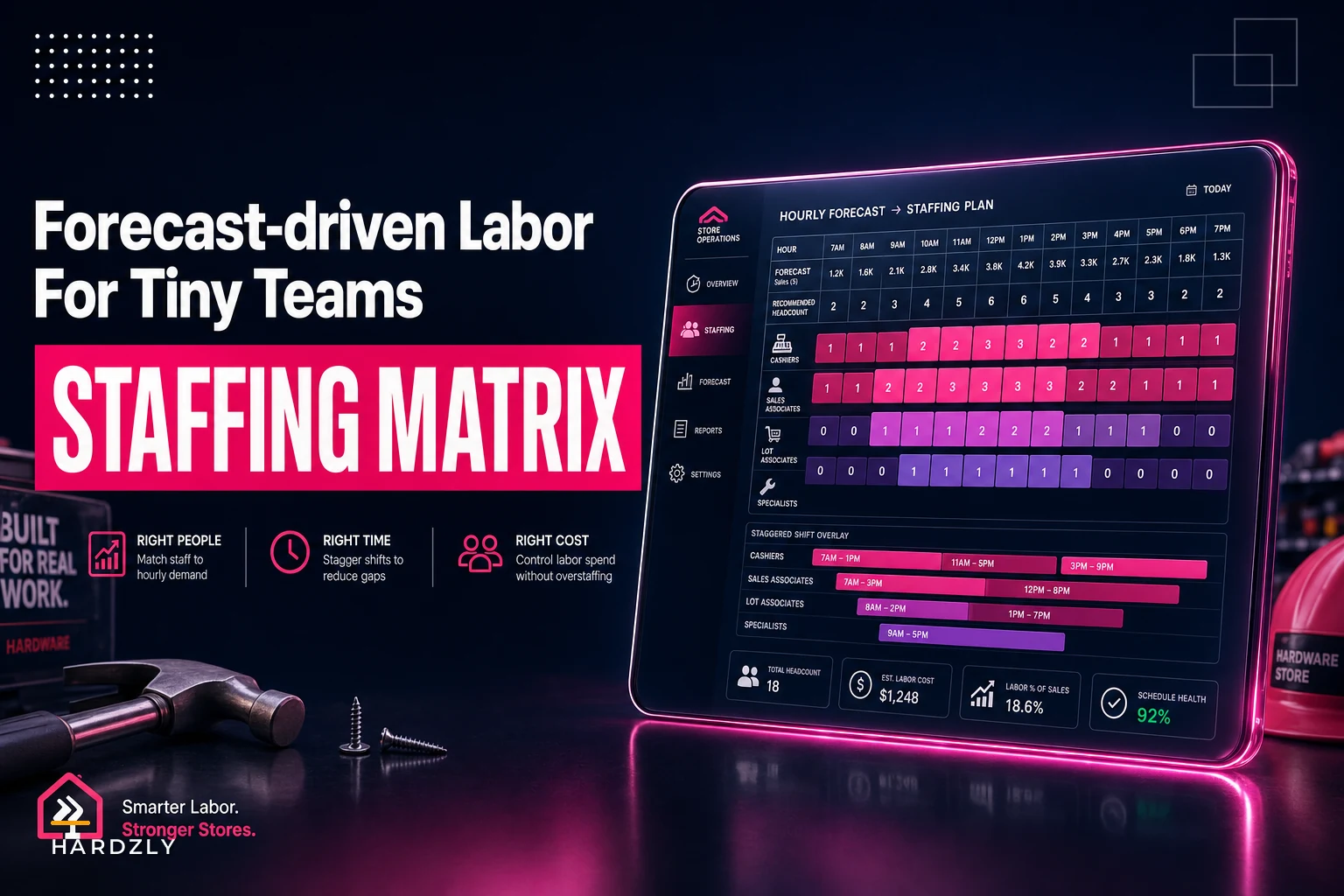
Now map forecasted sales in each hour to a headcount using a simple matrix. Here's a realistic example for a store with an SPLH target around $140:
| Forecasted hourly sales | Staffing level | Notes |
|---|---|---|
| Under $120 | 1 person | Minimum-cover only (see rules below) |
| $120 – $280 | 2 people | One on counter, one on floor/receiving |
| $280 – $480 | 3 people | Add dedicated floor help or paint/service |
| $480+ | 4 people | Peak — all hands, no non-essential tasks |
The matrix isn't the hard part. The discipline is. Owners look at a forecast of $260 for the 8am hour and think "eh, we'll manage with two." Sometimes that's fine. But when three contractors show up at 7:50 needing PVC, fittings, and a key cut, one person on the counter and one grabbing stock from the back means a line forms — and the fourth guy who just wanted a $6 tube of caulk leaves it on the shelf and drives to the big box.
Writing the matrix down removes the negotiation from a Tuesday at 6am when you're half-awake building next week's schedule.
Minimum-cover rules for one-person mornings
The single most dangerous shift in a small hardware store is the one-person open. It looks cheap on paper. It's often the most expensive shift you run when something goes sideways.
-
Never one-person during a forecasted delivery window. Receiving pulls a person off the floor completely.
-
Never one-person if forecasted sales cross your 2-person threshold, even for a single hour inside the shift.
-
The solo person does zero deep tasks — no reorganizing, no long phone calls, no back-room projects. Counter and quick floor help only.
-
Set a "call for backup" trigger
if more than a couple of customers are waiting or a task will pull them off the floor for more than a few minutes, they text you or the next scheduled person.
-
Cash and open/close checks get simplified so a solo opener isn't juggling a full procedure alone.
If you must run solo opens regularly, pre-assign a backup who is scheduled nearby and willing to come in on short notice.
Stores that lose money on one-person mornings rarely lose it on the payroll line. They lose it on walked sales and on the owner having to drop everything and drive in because the opener got buried. That's an invisible cost that never shows up in a labor report.
Worked example: staffing a Saturday peak window
Say your hourly forecast for a spring Saturday looks like this:
-
7am–8am
$95
-
8am–9am
$310
-
9am–10am
$520
-
10am–11am
$540
-
11am–12pm
$430
-
12pm–1pm
$260
-
1pm–2pm
$190
-
2pm–3pm
$175
Run that through the matrix:
-
7–8
1 person (under $120)
-
8–9
3 people ($310)
-
9–11
4 people (the $500+ peak)
-
11–12
3 people ($430)
-
12–1
2 people ($260)
-
1–3
2 people (borderline, but keep two for lunch coverage and returns)
Here's the operational move most stores miss: your peak headcount doesn't mean everyone starts at open. You stagger. The opener comes in at 6:45 solo. Two more arrive at 8. A fourth comes in at 8:45 to be fully ready for the 9am wall. Then you start shedding — one person cuts at noon, another at 1.
Compare that to the default "two people 7-to-3, third person 9-to-5" schedule most stores actually run. Under that model, you're overstaffed 7–8 (two people for a $95 hour) and dangerously understaffed 9–11 (two, maybe three people for a $500+ hour). You're paying for coverage in the wrong hours. Shifting those same labor dollars to match the curve costs you nothing extra and directly protects both margin and sales.
A 2-week rota template you can run
Two weeks is the right planning horizon for a tiny team — long enough for staff to plan their lives, short enough that your forecast is still accurate. Here's the build process:
-
Pull last 4–6 weeks of hourly sales and average each hour by day of week. This gives you a "typical Monday," "typical Saturday," etc.
-
Adjust for known events — a promo, a holiday, a big contractor job starting, seasonal shifts. If you've already mapped your season signals, layer them on top.
-
Apply the staffing matrix to each hour to get a headcount-by-hour grid for all 14 days.
-
Translate the grid into shifts by grouping adjacent hours and staggering start times to hit peaks.
-
Overlay minimum-cover rules — flag every one-person block and confirm none violate the delivery or threshold rules.
-
Check total labor cost against forecasted revenue. Most hardware stores target somewhere in the 9–14% range. If you're over, look for overstaffed midday hours before touching peaks.
-
Post it, then track actuals vs forecast the following week and adjust the matrix where you're consistently off.
A visual of the process can help keep the steps clear.
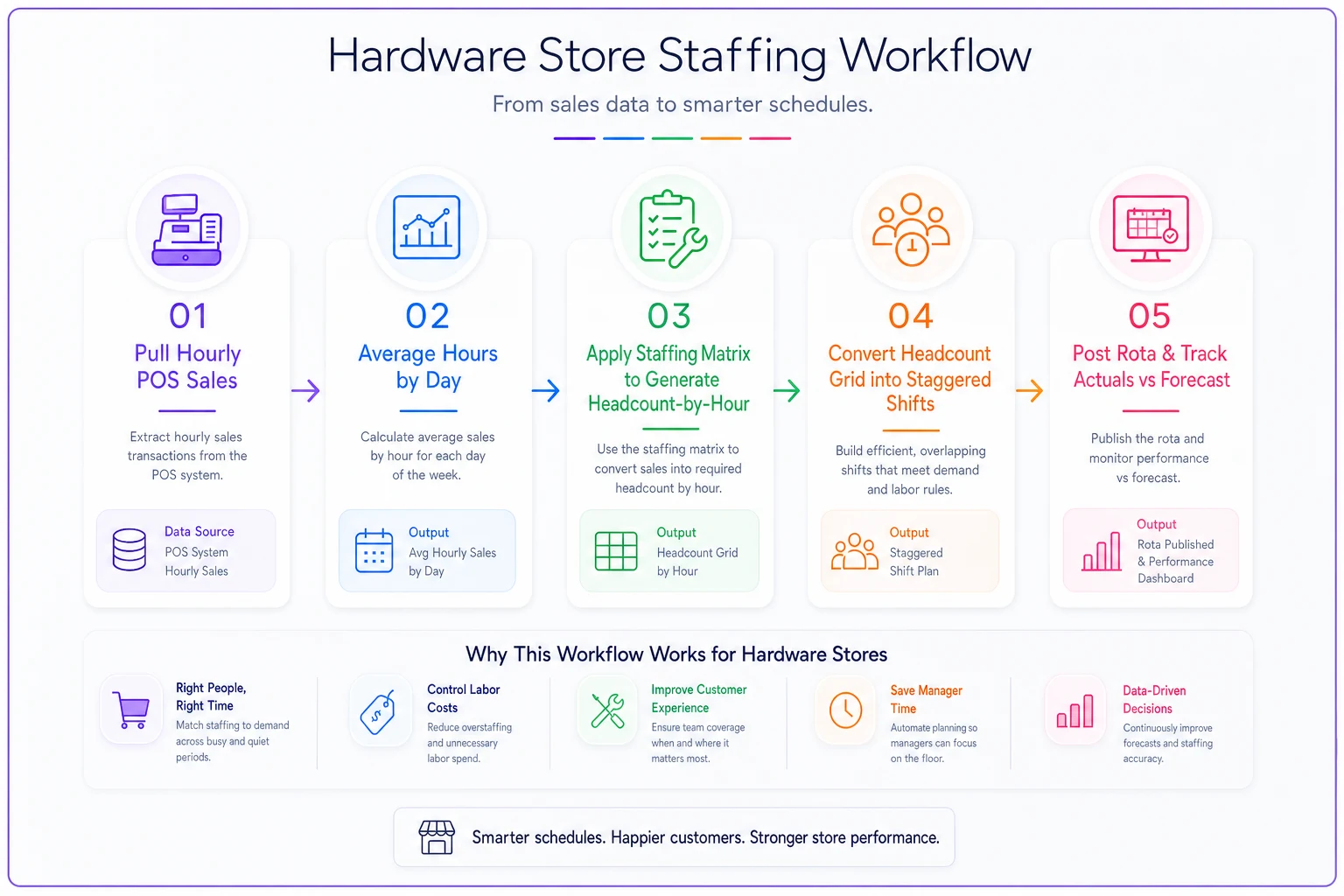
That last step is what turns this from a one-time exercise into a system. The first version of your rota will be wrong in places — the forecast will miss a slow Thursday or a surprise busy Monday. That's expected. You correct the matrix over a few cycles and it tightens up.
When this makes sense — and when it doesn't
This approach earns its keep when you have variable traffic and a team small enough that one wrong shift hurts. Three to eight people, meaningful hourly swings — the payoff is real.
It's a bad idea to over-engineer if you're genuinely a two-person operation where both people are there every day regardless. Nothing to optimize — you're already at minimum viable staffing.
It also breaks down if your POS data is dirty. Half your sales ringing up as one generic SKU, hours logged wrong — garbage in, garbage out. Clean data first.
And a warning: don't let the matrix override judgment on days you know are different. The forecast says Monday is slow, but you also know a local contractor crew starts a big job Monday and will clean out your fasteners at 6:30am. Trust that. The matrix is a floor for decisions, not a replacement for knowing your customers.
A quick real scenario
A five-person store doing somewhere around $1.1M–$1.3M a year kept running the same three fixed shifts every day. Labor was landing around 15–16% of sales — higher than they wanted — and the owner still felt short-handed on weekend mornings.
When they pulled hourly sales, the pattern was obvious: two people sitting through dead 1–4pm weekday hours, running thin during the 8–11am contractor rush. Nothing exotic. Just labor pointed at the wrong hours.
They rebuilt around a matrix, staggered starts to hit the morning peak, and cut one person early on the slowest weekday afternoons. Over the next couple of months labor drifted down toward 12–13% without cutting a single body from the payroll — just moved the hours. The weekend counter stopped backing up during the rush. The owner put it simply: it wasn't about working people harder, it was about having them there when customers actually showed up.
Keeping it honest over time
The reason forecast-driven scheduling drifts back to gut feel is that it's tedious to redo every two weeks by hand. Pulling hourly reports, averaging, applying the matrix, checking labor percentage — it's close to an hour of fiddly work that's easy to skip when you're slammed. That's exactly why it usually gets abandoned by week four.
The way to keep it alive is to tie it to a routine you already run. If you're doing the weekly Owner-10 financial routine, labor-vs-forecast fits neatly into that same review — you're already looking at payroll risk, so checking whether last week's staffing matched the sales curve takes a few extra minutes while you're there. Operational software that pulls hourly POS data and pre-fills the staffing grid helps too; instead of rebuilding the forecast from scratch, you're reviewing and adjusting a draft. But the tooling is secondary. The habit is what actually protects the margin.
Get the matrix written down, hold the line on one-person morning rules, and check actuals against forecast every couple of weeks. Do that consistently and you'll stop paying for empty hours and stop losing the contractor who won't wait in line — which, on a thin-margin store, is most of the game.
Ready to elevate your hardware store management?
Join 500+ hardware stores using Hardzly to boost operational efficiency, reduce stockouts, and grow revenue.