
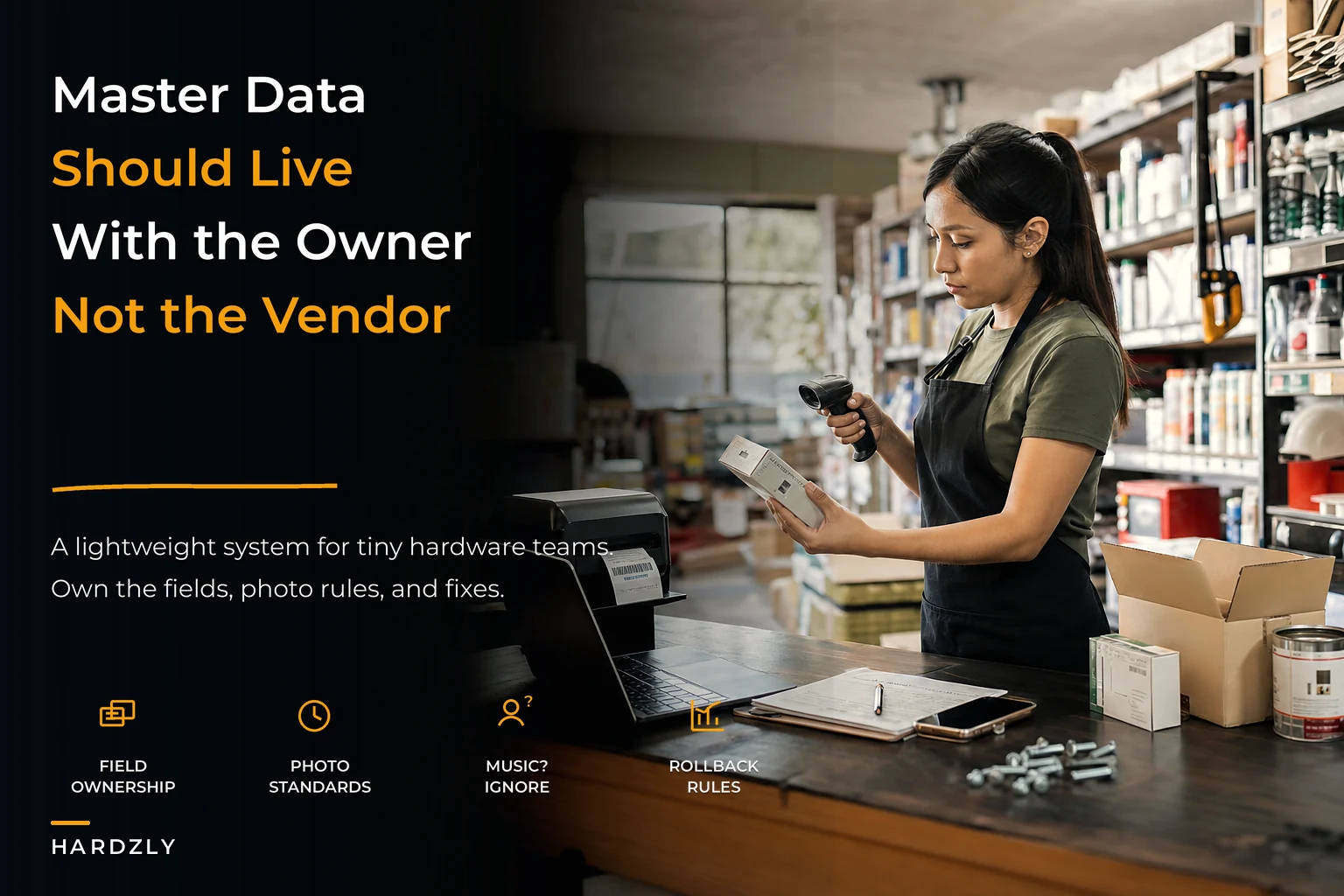

Your product data is probably a mess right now. Not because you're disorganized, but because master data management for retail gets treated like some big enterprise problem that needs committees and approval chains.
Meanwhile, you're trying to figure out why the Milwaukee drill bits show up as "MLWKEE BIT SET" in one system and "Drill Bit Kit - Milwaukee 29pc" in another, while your cashier just rang up the wrong SKU because the barcode on the shelf doesn't match what's in the POS.
Small stores don't need a complex MDM system. They need a simple one that a three-person team will actually follow when they're already juggling receiving, customers, and everything else. The fancy MDM solutions out there assume you have dedicated data stewards and IT support. You have Dave, who runs the register and does receiving on Tuesdays.
Why master data breaks down in small hardware stores
Master data problems in hardware stores look different than other retail. You're dealing with vendors who change part numbers seasonally, products that come in bulk but sell individually, and items where a single character difference matters (3/8" vs 3/8' is the difference between a bolt and a piece of rebar).
The breakdown usually starts at receiving. Your supplier sends 50 bags of concrete mix, but their invoice says "QKCRT 50LB" while your POS has it as "Quikrete Concrete Mix 50#" and the shelf tag just says "Concrete." Someone creates a new SKU instead of finding the existing one. Now you have duplicate products, inventory counts are split, and your reorder points are meaningless because the system thinks you have two different items.
-
Seasonal items that change SKUs every year (the same snow shovel comes back with a new vendor code)
-
Bulk items sold in multiple units (nails by the pound, piece, or box)
-
Products from multiple suppliers with completely different naming conventions
-
Items where tiny details matter (Grade 8 vs Grade 5 bolts look identical on the shelf)
Most stores try to fix this retroactively—massive cleanup projects every quarter where someone spends a weekend merging duplicates and correcting descriptions. But by Monday morning, the same problems start creeping back in.
The one-page field ownership matrix
What works: assign ownership of specific data fields to specific people, and make it dead simple to understand who owns what. Not departments, not categories—actual fields in your system.
Stop losing sales due to inventory gaps.
Hardzly helps you manage stock levels, orders, and supplier interactions efficiently.
- Unified inventory and sales tracking
- Supplier and purchase order management
- Automated workflow and task scheduling
No credit card required
| Field | Owner / Notes |
|---|---|
| Product Description | Whoever does the initial receiving owns this. They write it once, correctly, when the item first arrives. |
| Vendor SKU | The person handling purchase orders owns this. Usually that's the owner or manager who deals with suppliers. |
| Retail Price | Owner/manager only. No one else touches pricing data. |
| Shelf Location | Whoever stocks shelves owns this. When they move something, they update it. |
| Barcode/UPC | The receiver owns this during intake. If it doesn't scan, they flag it immediately. |
| Reorder Point | Manager owns this, reviews weekly based on the velocity report. |
The key is single-point accountability. When the drill bits are showing up wrong, you know exactly who to ask. When shelf locations are outdated, there's one person responsible.
Dave at receiving knows he owns product descriptions. When that DeWalt impact driver comes in, he doesn't just scan and stock—he checks that the description matches what's actually in the box. "DeWalt 20V Impact Driver Kit" not "DWLT IMPCT DRVR" or whatever shorthand the vendor used.
Photo capture standards that take 30 seconds
Every new product that comes through receiving gets photographed. Not professional product photography—just a clear phone photo that shows what the thing actually is. This sounds stupidly simple but it solves massive problems down the line.
The standard: white background (use the receiving desk), product out of package if possible, ruler or tape measure in frame for anything size-dependent. Thirty seconds per SKU.
Use the same corner of the receiving desk as your background to keep images consistent.
Six months later when someone's looking at "COUPLING 3/4 GALV" in the system, they can actually see it's a galvanized pipe coupling, not a garden hose coupling or electrical coupling. Your part-timer working Saturday doesn't have to guess what "BRS FTG 90 ELB" means—they can see it's a brass fitting 90-degree elbow.
Store these in a simple folder structure: Plumbing > Fittings > [SKU].jpg. Nothing fancy. Just organized enough that you can find them when linking to your POS forecast dashboard or updating online inventory.
The important part is doing this during receiving, not as a separate project. New item comes in, photo goes in the folder, filename is the SKU. If someone skips the photo, the item doesn't go on the shelf. That simple.
Weekly micro-audits: 15 minutes, 10 SKUs
Forget quarterly data cleanup projects. Audit 10 random SKUs every Monday morning before opening. Pull them from different categories—one fastener, one power tool, one plumbing item, etc.
Check five things:
-
Does the shelf tag match the POS?
-
Is the physical location correct in the system?
-
Does the barcode scan to the right item?
-
Is the description customer-friendly? (Would someone searching actually find this?)
-
Is the reorder point still valid?
This takes 15 minutes. Fix problems on the spot, not in a spreadsheet for later. After a year, you've audited around 520 SKUs—probably a solid chunk of your high-velocity items. More importantly, you catch systemic problems early. If three fasteners in a row have wrong locations, something's broken in your stocking process.
Stores that do these micro-audits consistently end up with noticeably fewer "can't find it" situations and far fewer inventory adjustments at year-end. Not because they're doing massive overhauls, but because they're catching problems while they're still small.
Rollback and import rules (when vendors "help" with data)
Vendors love to send you "updated" product data. New catalogs, revised SKU lists, bulk pricing updates. They mean well, but importing this blindly breaks everything you've carefully maintained.
Never overwrite descriptions you've customized. The vendor's "1/4-20X2 HHCS ZN" means nothing to your customers. Your "1/4-20 x 2" Hex Head Cap Screw, Zinc Plated" does.
Create a staging area for vendor updates. Import to a separate spreadsheet first, compare to what you have, then selectively update only what needs changing. Pricing? Sure. Random description changes? No.
Keep rollback data for every import. Before accepting any vendor data update, export your current data with timestamps. Name it something obvious like "PREDEWALTUPDATE112024.csv". When something breaks, you can revert specific fields.
Vendor SKU changes get logged, not automatically accepted. If Hillman changes all their fastener SKUs (they do this every few years), you map old to new—you don't delete the old. Your historical sales data and reorder points depend on that continuity.
A real example: a hardware distributor sends a "helpful" update that changes all screw descriptions to include thread pitch in decimals instead of fractions. Suddenly customers can't find anything because they're searching "1/4-20" not "0.25-20". You need to be able to roll that back immediately, not spend three days fixing it.
Receiving-to-shelf tag connection
The journey from receiving dock to shelf is where most retail master data for small stores falls apart. Product comes in, gets a quick check against the PO, then goes to the floor—and the data side gets ignored until something breaks.
A better flow:
When products arrive, the receiver scans the vendor barcode. If it doesn't match anything in your system, stop. Don't create a new SKU yet. Check if this is a vendor code change for an existing item. A fair number of "new" items are actually old items with updated packaging or codes—more than you'd expect.
Print shelf tags during receiving, not later. The moment you confirm what the item is and where it's going, print the tag. The receiver walks the item to the shelf with its tag. This seems inefficient but it prevents the classic problem of items sitting in the back room for days because "someone needs to make tags."
Your shelf tag itself becomes part of data governance. Include:
-
SKU (big, readable)
-
Price
-
Simple description
-
Vendor item number (small print)
-
Last received date
That last received date matters more than most people realize. When a customer asks "did you get more of these?", your staff can answer instantly. When you're wondering if something's been sitting forever, you know.
For items with multiple vendors—like standard fasteners—the shelf tag shows your master SKU, but you maintain a simple cross-reference sheet at receiving. "These four vendor codes all map to SKU 10234." Far better than creating four different SKUs for the same 1/4" washer.
Here's a quick visual of the receiving-to-shelf workflow.
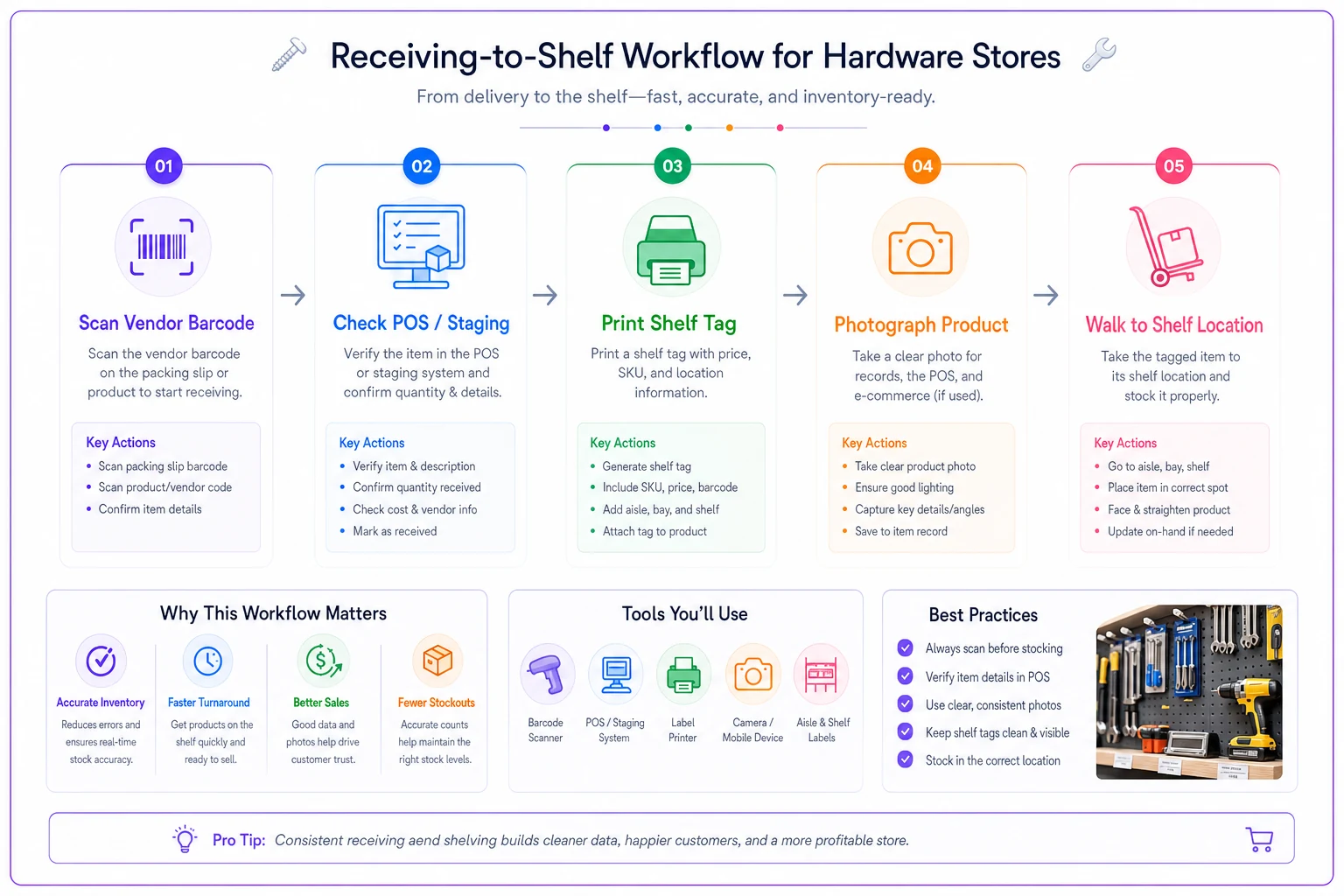
This visual shows the steps the receiver follows from scanning to shelving.
The limits of manual governance (and when to automate)
This lightweight system works well until you're somewhere around 5,000 active SKUs or approaching $2M in revenue. After that, things start slipping. You'll know you've hit the limit when:
-
Weekly audits start taking 45 minutes instead of 15
-
Duplicate SKUs keep getting created despite the rules
-
Staff spend more time looking up items than selling them
-
Your receiver is burning an hour a day just fixing data issues
This is where intelligent automation actually makes sense—not to replace your governance, but to enforce it at a scale humans can't keep up with manually. AI-powered operational software can catch duplicate SKUs as they're being created, suggest the right product match based on a vendor's confusing description, or automatically map vendor codes to your master SKUs.
The automation handles matching and flagging while your team makes the actual decisions. Instead of Dave trying to remember if "MLWKE 48223103" is a drill bit set or a driver bit set, the system shows him the last three times this vendor code came in and what SKU it mapped to.
What matters here is that you need the manual governance structure first. Automation without rules is just faster chaos. Stores that succeed start with the one-page matrix and simple standards, then add automation as volume grows. The ones that struggle try to automate their way out of a master data mess without fixing the underlying process first.
Real-world example: Town Hardware's 6-month turnaround
A hardware store in Nebraska had about 3,500 SKUs and constant inventory problems. A customer would ask for something they bought last month, staff couldn't find it in the system—turned out it was entered under three different descriptions.
They implemented this exact approach. The owner assigned field ownership (receiver owned descriptions, manager owned pricing, floor staff owned locations), started the photo-capture rule, and began Monday morning audits.
Month one was rough. They found roughly 400 duplicate SKUs in fasteners alone. But they didn't try to fix everything at once—just handled duplicates as they came up in audits or receiving.
By month three, receiving was actually taking less time despite the photo requirement, because they weren't creating duplicates or hunting for existing SKUs anymore. The Monday audits were finding fewer problems each week.
Month six:
-
Inventory adjustments dropped from around $8,000 to roughly $3,000
-
Customer "can't find it" complaints
nearly gone
-
Year-end inventory
12 hours instead of a full weekend
-
Most telling—reorder points started actually working because the data behind them was clean
They eventually added operational software to help with vendor SKU mapping and automatic duplicate detection. But the foundation was that simple one-page governance model.
Making it stick with three people
The hardest part isn't setting this up—it's keeping it running when everyone's busy.
Make it visible. That field ownership matrix isn't in a drawer. It's laminated and hanging at the receiving station. The audit checklist is on a clipboard by the register.
Connect it to existing workflows. Don't make data governance a separate task. It's part of receiving, part of stocking, part of the Monday opening routine. You're already doing these things, just adding a data check to each.
Show the impact. When the micro-audit catches a pricing error before a customer does, mention it. When clean data means reorders actually arrive when needed, point it out. People maintain systems when they can see what those systems are actually doing for them.
Rotate the boring parts. Weekly audits get tedious fast. Have different people run them each week. Fresh eyes catch different problems, and everyone stays connected to how the data affects their job.
You don't need more than what's described here to maintain solid retail master data for a small store. One page of rules, phone photos, 15-minute weekly audits, careful vendor data handling, and tight receiving-to-shelf processes.
Once this foundation is solid—usually somewhere between three and six months in—you can layer on more sophisticated tracking. Connect it to your SKU cleanup playbook for deeper vendor mapping. Use clean data to build better reorder points and velocity analysis. But start here, with the basics your small team can actually maintain.
Master data management doesn't need to be complex for small hardware stores. You need clarity on who owns what, simple standards everyone can follow, and quick regular checks instead of massive cleanup projects.
The stores with clean data aren't the ones with fancy systems. They're the ones where the receiver knows they own descriptions, where photos happen during receiving, where someone spends 15 minutes every Monday checking random SKUs, and where vendor updates get filtered instead of blindly accepted.
Start with the one-page matrix. Get everyone bought into their piece. Add photos this week. Schedule your first Monday micro-audit. In six months, you'll wonder how you ever ran the store without it.
The goal isn't perfection. It's having data clean enough that your systems actually work—reorder points trigger correctly, customers find what they need, and you're not losing hours every week to confusion and cleanup. That's achievable with three people and the simple structure outlined here.
Ready to elevate your hardware store management?
Join 500+ hardware stores using Hardzly to boost operational efficiency, reduce stockouts, and grow revenue.