

Most returns that walk back through the front door of a hardware store aren't really product failures. They're paperwork failures. The drill still works. The customer just can't find the receipt, doesn't remember the brand's warranty terms, and has no proof of purchase date — so the path of least resistance is to bring it back to you and ask for a refund instead of filing a claim with the manufacturer.
That's the gap this post addresses. Not a loyalty program, not a CRM overhaul — just a tight protocol at the register that captures enough warranty-relevant info at the moment of sale so that six months later, a claim is a 90-second lookup instead of an argument over a crumpled receipt.
Why warranty-eligible items come back as returns instead of claims
Walk the return counter at any independent hardware store for a week and the pattern shows up fast. A meaningful chunk of returns on power tools, pumps, pressure washers, cordless yard equipment, and plumbing fixtures land inside the manufacturer's warranty window — but the customer has no way to prove it, and you have no record tying that unit to that person.
The mechanical reason is pretty straightforward. The manufacturer warranty lives with the brand, not with you. But the proof that activates it — purchase date, model, serial — lives on a thermal receipt fading in a glovebox or a junk drawer. When the tool fails, the customer isn't going to dig through a manufacturer's registration portal. They're going to drive back to the store they trust and expect you to handle it.
So you eat it. Refund out of pocket and fight for vendor credit later, or refuse and lose the relationship. Both options are expensive.
There's a second reason that's a bit subtler: nobody at the counter is actually set up to capture warranty info without slowing the line. Ask a cashier to collect name, email, phone, model, and serial on a busy Saturday and the whole thing collapses. Registration dies the moment it adds friction. That's why the protocol below is built around one field, not five.
The core idea: capture the minimum that makes a claim provable
You don't need a full customer profile to protect yourself on warranty. You need to be able to answer three questions later:
Stop losing sales due to inventory gaps.
Hardzly helps you manage stock levels, orders, and supplier interactions efficiently.
- Unified inventory and sales tracking
- Supplier and purchase order management
- Automated workflow and task scheduling
No credit card required
-
Did this person buy this exact unit here?
-
On what date?
-
What's the model and serial?
Your POS already captures the date and, if you scan it, the model. The only thing consistently missing is a reliable way to link the transaction to a reachable customer and, for serialized items, the serial number.
So the registration ask gets reduced to one field: a phone number or email. Everything else either already exists in the transaction or gets attached by staff, not the customer. That's the difference between a protocol people actually run and one that dies in week two.
The one-field registration protocol
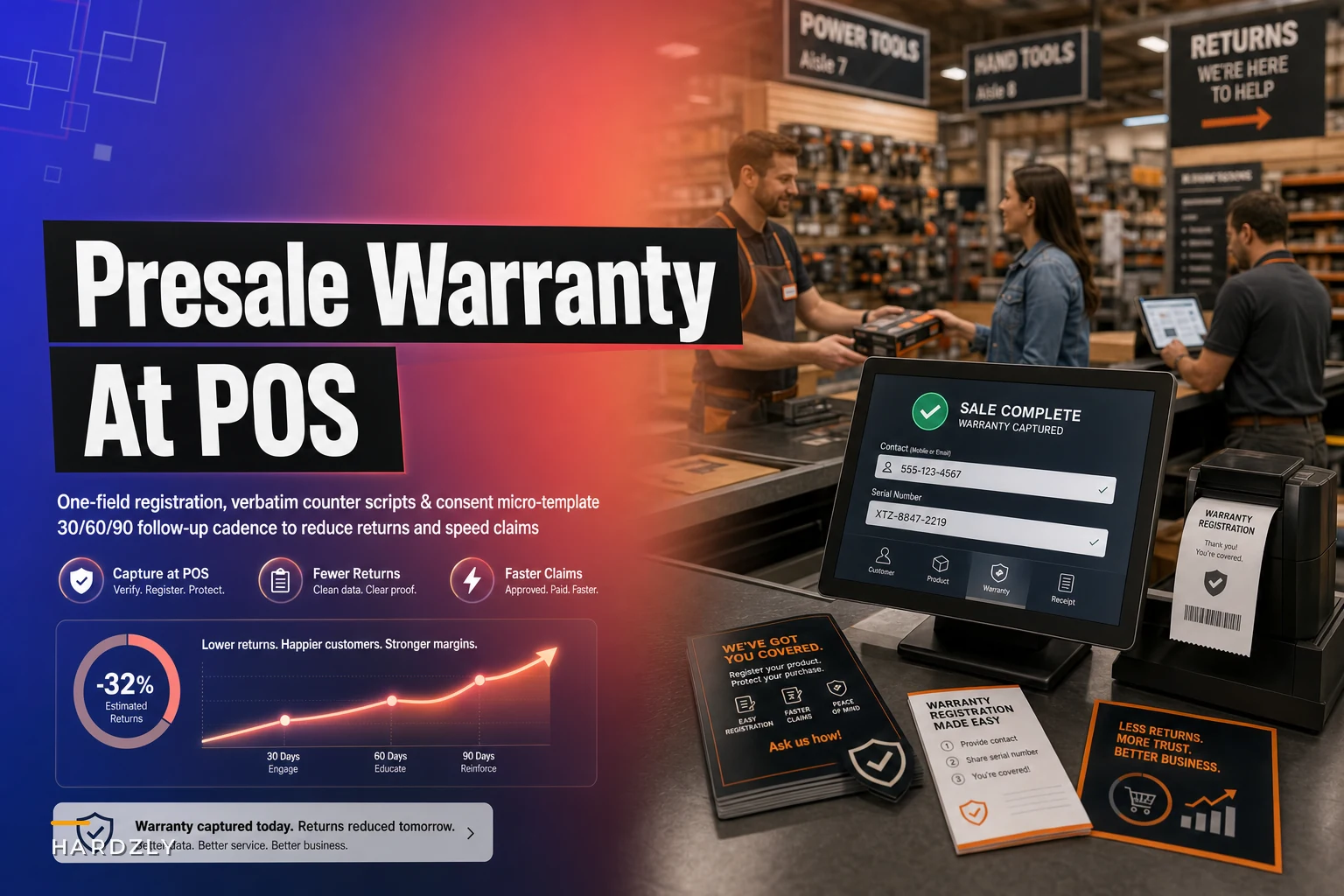
The full flow, built to add less than 20 seconds to a transaction on a warranty-eligible item:
-
Flag the item. When a warranty-eligible SKU is scanned, the register — or a shelf tag or counter card — signals the cashier this is a "register me" item. Start with a short list: cordless tools, generators, pumps, pressure washers, water heaters, major power tools.
-
Capture the serial. For serialized units, scan or key the serial into the transaction line. This is the step most stores skip and later regret. If you already serialize rental and high-value tools, this is the same muscle — see the approach in our rental tool serialization workflow.
-
Ask the one field. Cashier asks for a phone number or email using the script below. One field. No forms.
-
Attach + consent. Phone or email gets attached to the transaction, and the cashier taps the consent checkbox after reading the micro-template below.
-
Hand them the counter card. A small printed card that tells the customer exactly what to do if the item ever fails — and that their purchase is on file.
Date and model come from the transaction. Serial comes from the scan. Contact and consent is the only human ask. The customer fills out nothing.
Exact counter scripts
Scripts matter more than most people realize. "Would you like to register for warranty?" gets a no nine times out of ten because it sounds like a marketing opt-in. Frame it as their protection and the yes rate climbs noticeably.
Standard ask (use this one): > "This one's covered under warranty — want me to put it on file so if it ever quits on you, you don't need the receipt? Just need a cell or email."
If they hesitate: > "No marketing, promise. It's just so if it fails in the next couple years we can pull it up and handle the claim for you instead of you digging for paperwork."
If they decline: > "No problem. Hang onto this card then — it's got the model and the steps if you ever need to file." (Hand them the counter card anyway.)
For serialized high-value items: > "Logging the serial on this one too — that's what the manufacturer needs for a claim, so it's all in one place if you ever call us."
Notice what these scripts don't do: they don't pitch a newsletter, they don't ask for a full name, they don't explain the whole program. One benefit, one ask, done.
Consent micro-template
Keep consent short, honest, and specific to warranty use. Overbroad language like "we may contact you with offers and promotions" is exactly what makes customers say no — and it muddies your records if you ever do want to market to them later.
Consent wording (read or posted at counter, logged with the transaction): > "We'll store your contact info with this purchase to help with warranty claims and product recalls. We won't sell it or use it for marketing without asking you separately. You can ask us to remove it anytime."
Log the consent as a yes/no tied to the transaction, with the date. If a customer later opts into marketing, that's a separate consent — keep them distinct. This matters in states with tighter privacy rules, and it keeps your warranty file clean for its actual purpose.
Printable counter card
This is the card you hand the customer. Print it on business-card-sized stock or a quarter sheet. The point is that they keep a record of what to do, which cuts down on confused return visits.
Front:
-
Call us
____
-
Tell us the item (or bring it in)
-
We'll pull up your purchase + handle the claim
Model: Serial: Purchase date: __
Back:
Manufacturer warranty: (fill in years) Covers: defects in materials/workmanship Does NOT cover: normal wear, misuse, consumables Store: _ Hours: _
Have the cashier write in the model, serial, and date, or print it from the POS if your system supports it. Even handwritten takes ten seconds and makes the customer feel the purchase is genuinely tracked.
The 30/60/90 follow-up cadence
The counter capture is half the system. The follow-up cadence is what actually reduces returns and speeds claims — because it catches problems early, while they're still clean warranty claims and not angry refund demands.
Three light touches after a warranty-eligible sale, each with a specific operational purpose. This isn't a drip campaign. It's claims triage.
| Touch | Timing | Purpose | What it does |
|---|---|---|---|
| Day 30 | ~1 month post-sale | Catch early failures / DOA | Short "everything working?" check. Early failures are clean warranty claims and almost never become disputes. |
| Day 60 | ~2 months | Reinforce the record | Quick reminder that the purchase is on file and how to reach you. Keeps you top-of-mind as the warranty contact, not the refund counter. |
| Day 90 | ~3 months | Surface usage issues | Catches "it's acting up" problems before the customer gives up and brings it back for a refund. Steers them into a claim. |
Day 30 touch (text or email): > "Hi — checking in on the [item] you picked up last month. Working as expected? If anything's off, reply here and we'll sort it out under warranty. Receipt not needed, it's on file."
Day 90 touch: > "Quick check on your [item]. Any issues starting up? If so, don't bring it back for a refund — let us file the warranty claim, it's usually faster and you keep the tool."
That last line is doing the heavy lifting. You're explicitly redirecting a would-be return into a claim. Pair this with clear communication on turnaround times so the customer isn't left guessing — the same principle behind keeping customers calm during backorders and partial shipments applies equally to warranty claim timelines.
Claims triage: what to do when one comes back
When a follow-up surfaces an issue, or a customer calls in, run it through a quick triage so you're not defaulting straight to a refund:
-
Is it inside the manufacturer window? Pull the transaction, confirm date and serial.
-
Is it a covered defect or wear/misuse? Covered defect → file claim. Wear or consumable → explain, offer the replacement part sale.
-
Is the claim likely to be fast? Some brands authorize on-the-spot swaps for known defects. Keep a one-page cheat sheet of your top vendors' claim contacts and typical turnaround times.
-
Can you advance the swap? For a trusted customer with a clean record and a common defect, swapping immediately and reclaiming vendor credit keeps the relationship — but only when the vendor reliably honors it.
The whole point of having the purchase on file is that this triage takes a minute, not a standoff at the counter.
A real scenario
A single-location hardware store moving solid volume on cordless outdoor equipment and pumps was absorbing a steady stream of returns on items that were, in most cases, still under warranty. Staff had no fast way to prove purchase date, so they'd issue refunds to avoid arguments and then chase vendor credit inconsistently afterward.
They rolled out the one-field protocol across about a dozen SKU categories. Cashiers captured a phone or email and, for serialized units, the serial number. The counter card went out with every eligible sale. A 30/90 text went out automatically from their system.
Over the following couple of quarters, the shift wasn't dramatic in volume but it was clear in outcome. A meaningful share of what used to be out-of-pocket refunds turned into manufacturer claims instead. Roughly a third of warranty-eligible returns got redirected into claims the vendor covered. The Day 30 text caught several near-DOA units early — painless claims every time. The owner's rough estimate was somewhere in the low thousands recovered per quarter that had previously leaked out as refunds, plus fewer tense conversations at the counter.
The staff feedback was the part nobody anticipated: cashiers actually preferred it. "It's on file, let's file the claim" is a much easier thing to say than "do you have your receipt?"
When this makes sense — and when it doesn't
This makes sense when:
-
You sell warranty-eligible, higher-ticket items — tools, pumps, generators, water heaters.
-
You're absorbing returns that are actually warranty claims in disguise.
-
Your POS can attach a contact field and ideally a serial to a line item.
This is a bad idea when:
-
Your mix is almost entirely low-cost consumables with no meaningful warranty. The capture overhead won't pay off.
-
You can't get staff to run even a one-field ask consistently — fix the counter habit first before layering on a follow-up cadence.
-
You'd be tempted to use the contact list for marketing. That breaks trust and, depending on your consent wording, may break the law.
Who should skip it: very low-volume stores where you already know every customer by name and can reconstruct a purchase from memory. If the informal system is working, don't add process for its own sake.
Making the follow-up cadence actually run
The counter protocol is a habit problem. The cadence is a memory problem — and memory problems are where good intentions quietly die. Nobody is going to manually remember to text a customer 30 and 90 days after a specific sale. It just doesn't happen.
This is where a bit of automation earns its keep. A POS or operational platform that can tag a sale as warranty-eligible, store the contact and serial against the transaction, and fire the 30/60/90 touches on schedule turns this from "a thing we meant to do" into something that runs without anyone babysitting it. The capture stays human and fast at the counter; the follow-up stays consistent without the manual overhead. That's the right split.
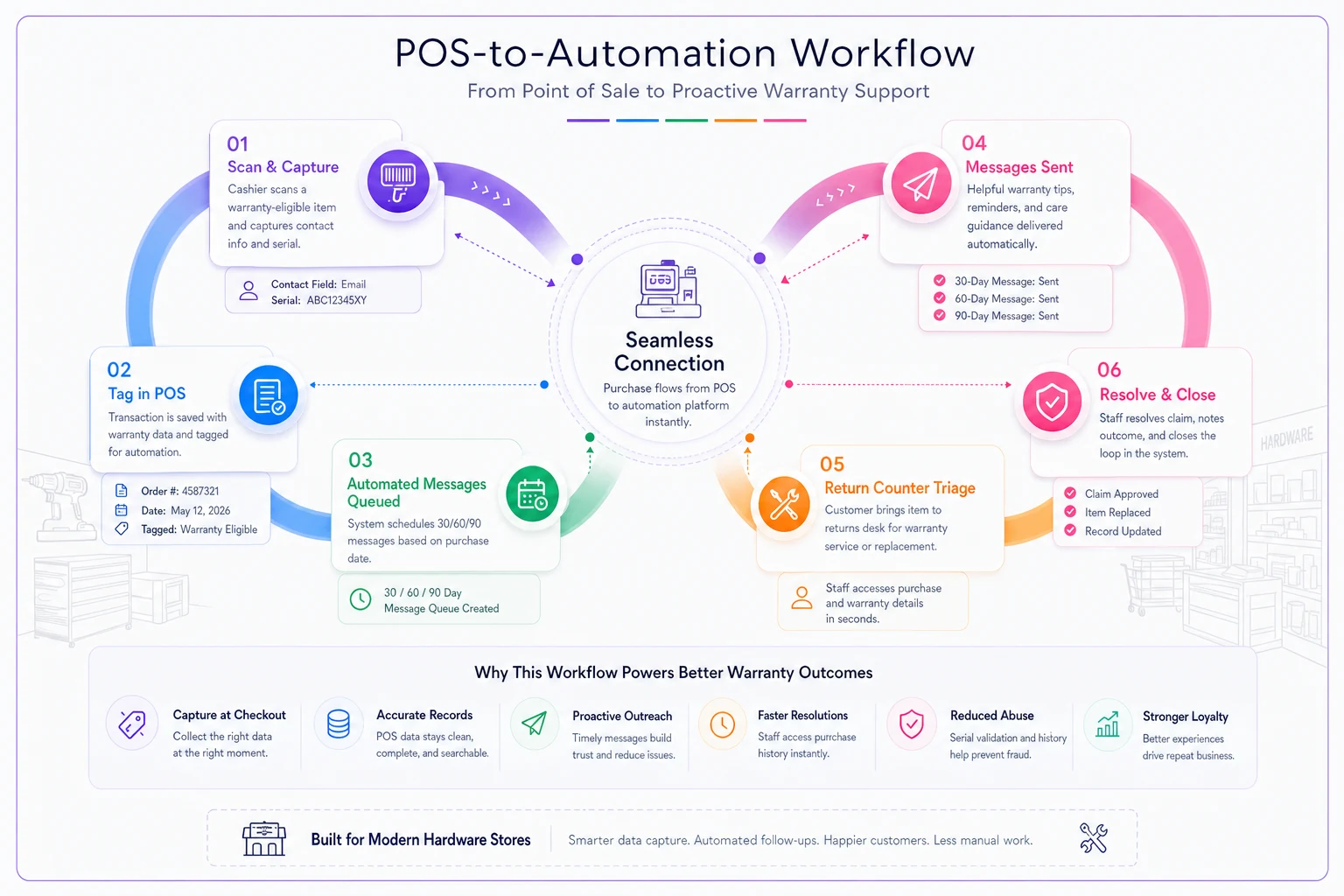
If your POS can surface warranty-eligible tags at returns, use that to speed triage.
If your system can also surface — at return time — whether the item is still inside its warranty window based on the stored serial and purchase date, your triage gets even faster. Worth asking about before assuming it's not possible.
The takeaway
Warranty registration at POS isn't about building a marketing database. It's about making sure that when a tool fails, the default path is a manufacturer claim — not a refund out of your pocket. Strip the ask down to one field, capture the serial on serialized items, hand over a card that tells the customer what to do, and keep three light touches on the calendar afterward.
Do that consistently, and a lot of the returns you're currently eating turn back into what they always should have been: claims the vendor pays for.
Warranty registration at POS isn't about building a marketing database. It's about making sure that when a tool fails, the default path is a manufacturer claim — not a refund out of your pocket. Strip the ask down to one field, capture the serial on serialized items, hand over a card that tells the customer what to do, and keep three light touches on the calendar afterward.
Do that consistently, and a lot of the returns you're currently eating turn back into what they always should have been: claims the vendor pays for.
Ready to elevate your hardware store management?
Join 500+ hardware stores using Hardzly to boost operational efficiency, reduce stockouts, and grow revenue.