

Most hardware stores don't have a data problem. They have a handoff problem. The POS knows one price, the shelf tag says another, the supplier feed calls the item by a different number, and the cash drawer tells a story none of those three agree with. Nobody wrote down who owns the truth when they disagree. So every week, somebody — usually the owner — spends an hour untangling it by hand.
A single-location retail systems map fixes this not by adding software, but by writing down the contract between your data sources: what each record must contain, when information moves, what triggers a decision, and who gets pulled in when something breaks. One page. Pinned to the wall or saved as a PDF your whole team can read in five minutes.
This isn't a dashboard and it isn't a report. It's the governance layer underneath those things — the part almost every small store skips, which is exactly why the dashboards end up lying.
Why the disagreements happen in the first place
Walk the data path of a single box of deck screws. It arrives on a supplier feed with the vendor's SKU and pack quantity. Someone receives it and keys it into the POS under your internal SKU, maybe fat-fingering the cost. The shelf tag gets printed from the product master, which hasn't been updated since the last price increase. The item shows "in stock" on your Google listing because that sync ran last night before the morning rush sold the last four. And the cash it generated lands in a drawer total that nobody reconciles against the actual units sold.
Five systems touched that box. None of them was designated as the source of truth for any single field. That's the root cause. Data doesn't rot because people are careless — it rots because no field has a declared owner and no handoff has a declared trigger.
What you see across a lot of small stores is that the mess scales non-linearly. At 1,200 SKUs with one person doing everything, the owner holds the reconciliation in their head and it mostly works. At 4,000 SKUs with a part-timer helping receive, that mental model breaks. The owner no longer knows which price is right without physically checking three places. That's the moment stores either build a contract or resign themselves to permanent low-grade chaos.
What a data contract actually is (and what it isn't)
A data contract is a plain-language agreement that says, for each record type:
Stop losing sales due to inventory gaps.
Hardzly helps you manage stock levels, orders, and supplier interactions efficiently.
- Unified inventory and sales tracking
- Supplier and purchase order management
- Automated workflow and task scheduling
No credit card required
-
Which fields are required (not optional, not "nice to have")
-
Which system is the authoritative source for each field
-
When data flows from one place to another (nightly, weekly, on-event)
-
What triggers a human decision
-
Who escalates when a trigger fires and the automatic rule can't resolve it
It is not an integration spec, a software purchase, or a technical document. You can run the whole thing on a spreadsheet and a printed page. The point is that when the POS price and the shelf tag disagree, the contract already told you which one wins and who fixes the loser.
Think of it like the labeling and par-level discipline you'd apply to physical stock, except pointed at your data. If you've built out a product master data system, the contract is the governance wrapper that keeps that master honest over time — the rules that stop it from drifting back into mush six months later.
The required-fields backbone
Start by deciding what must exist on every record before it's allowed into the system. This is the single highest-leverage part of the whole map, because garbage that enters here pollutes everything downstream.
A workable minimum for a hardware store, record type by record type:
| Record type | Required fields | Authoritative source |
|---|---|---|
| Product master | Internal SKU, description, category, unit of measure, current cost, current retail, active/discontinued flag | Product master (you) |
| POS item | Internal SKU, retail price, tax flag, on-hand qty | POS, syncs retail from master |
| Supplier feed line | Vendor SKU, mapped internal SKU, pack qty, landed cost, lead-time bucket | Supplier, but mapping owned by you |
| Local listing | Internal SKU, display title, on-hand qty, availability flag | Listing channel, qty from POS |
| Cash/sales record | Date, units by SKU, gross sales, discounts, drawer variance | POS + end-of-day count |
The column that matters most is the right one. Retail price lives in the product master and flows to the POS and listings — not the other way around. That single rule eliminates the most common disagreement in small stores: someone changing a price at the register that never makes it back to the master, so next week's tags reprint the old number.
The mistake stores make here is treating "required" as aspirational. If a field is required and a record shows up without it, the record gets rejected or quarantined — it does not get waved through "just for now." Every "just for now" exception is a future reconciliation hour.
Mapping the signal flows: nightly vs. weekly
Not everything needs to move in real time. A tiny team that tries to sync everything constantly ends up with more failure points, not fewer. The art is deciding what moves nightly, what moves weekly, and what moves only when a human pushes it.
Nightly (automatic, no human needed):
-
POS on-hand quantities → local listings (so "in stock" stops lying)
-
Day's sales by SKU → cash/sales record
-
Drawer count variance flagged if over threshold
Weekly (semi-automatic, human reviews before it commits):
-
Supplier feed → product master cost updates (review cost changes above a set %)
-
New vendor SKUs → mapping queue for a human to map
-
Discontinued-flag reconciliation between master and POS
On-event (human triggers):
-
New SKU onboarding (full required-fields entry)
-
Price changes in the master
-
Supplier substitution or pack-size change
The workflow in plain terms: overnight, quantities and sales move on their own and anything weird gets flagged. Once a week, you sit down to a short review queue — not the whole database, just the exceptions the nightly flow couldn't resolve. You approve, reject, or escalate each one. If that review regularly runs longer than 20–30 minutes, your thresholds are too tight and you're being asked to approve things that should auto-pass.
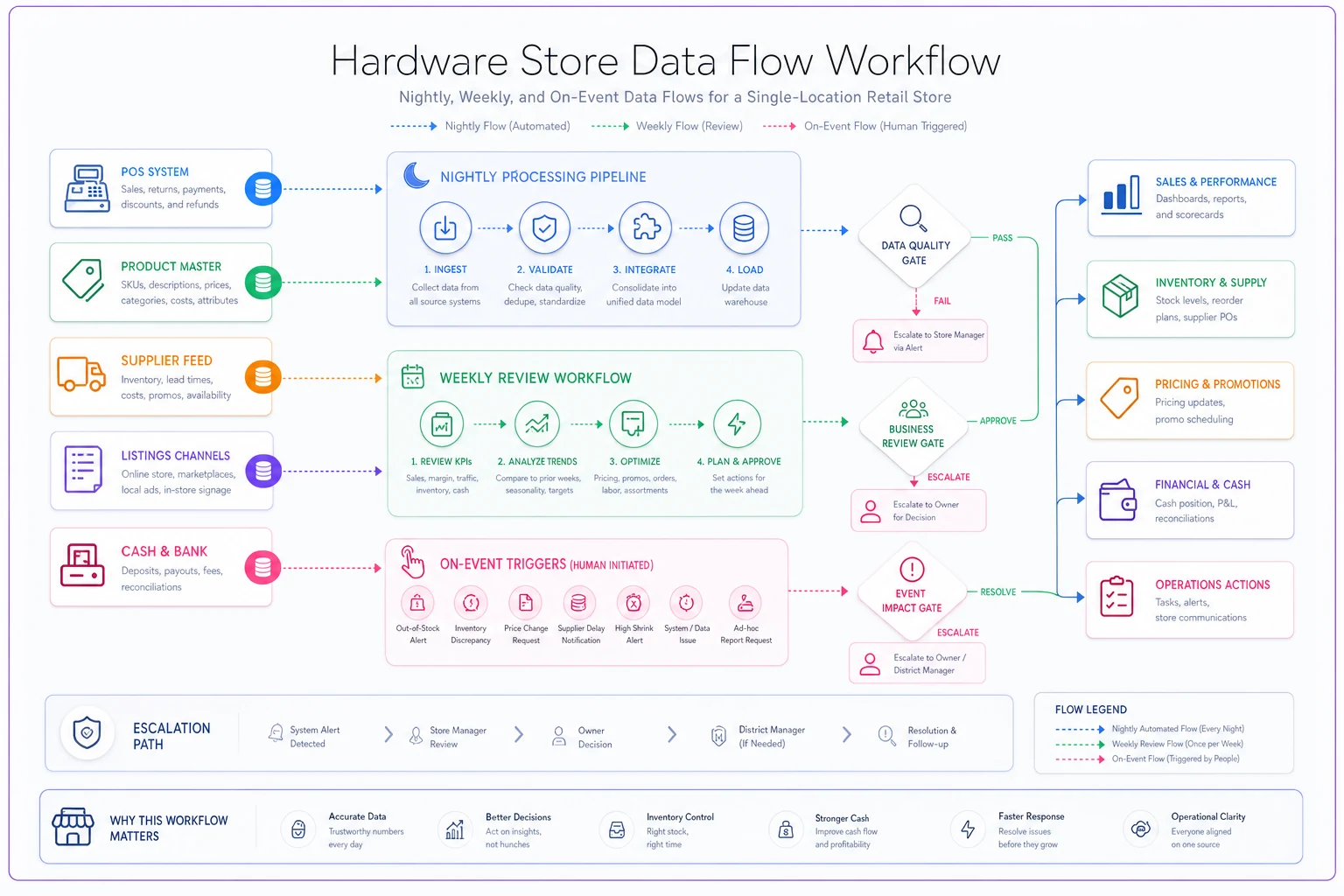
This mirrors the logic behind a good operational reporting backbone: the system does the moving, the human does the judging, and you never confuse the two jobs.
Decision triggers and escalation gates
A systems map without triggers is just a diagram. The triggers are what turn it into something that actually protects your margin and your cash. Each trigger needs three things: a condition, a default action, and an owner who gets it when the default isn't enough.
A few that earn their keep in a hardware store:
-
Cost jumped more than ~8% on a supplier feed → default
hold the retail price, flag for review → owner decides whether to reprice or absorb.
-
Listing shows in-stock but POS on-hand is zero or negative → default: force availability to "unavailable" → owner investigates the count error.
-
Drawer variance over ~$15 for the day → default
log and continue → owner reviews at the weekly session; variance over ~$40 escalates same-day.
-
A SKU sold with no mapped cost → default
quarantine the sale from margin reporting → owner maps the cost retroactively.
-
New vendor SKU can't match any internal SKU → default
park in mapping queue → owner maps or creates a new master record.
The pattern worth noticing: the default action is almost always the conservative one. Hold the price, mark it unavailable, quarantine the record. You'd rather temporarily under-report than let bad data flow into decisions about reordering and cash. For a store where cash timing is tight, that conservatism connects directly to cashflow governance — a margin or cost error that slips through the gates eventually shows up as a surprise in your payables.
Escalation gates matter even on a two-person team. "Owner escalation" doesn't mean a committee. It means: if the default rule can't resolve it, exactly one named person decides, and the decision gets written back into the record so it's not re-litigated next week.
The phased 3-step rollout
You don't build this all at once. A 1–3 person store that tries to launch the full map in a weekend will abandon it by Wednesday.
Step 1 — Required fields + one authoritative source (week 1–2).
Pick the product master as your single source of truth for price and cost. Write down the required-fields table. Clean the records that violate it. Don't touch flows or triggers yet. Just get one clean spine. Most stores find somewhere between 5–15% of SKUs are missing a required field or carrying a stale price — fixing those alone kills a surprising share of weekly friction.
Step 2 — Nightly flows + CSV fallbacks (week 3–5).
Turn on the nightly quantity and sales flows. Critically, build a CSV fallback for every automatic flow before you rely on it. If the sync breaks — and it will, during a busy Saturday — you need a manual export/import path that keeps the contract intact. A store with no fallback treats a broken sync as a crisis. A store with a CSV fallback treats it as a ten-minute manual step.
Step 3 — Triggers, escalation gates, and the weekly review (week 6+).
Only now do you add the decision triggers and the weekly exception queue. By this point your data is clean and your flows are reliable, so the triggers fire on real exceptions instead of drowning you in noise from a dirty database.
The reason this order works: each phase makes the next one survivable. Triggers on dirty data are useless. Flows without fallbacks are fragile. Fields without an authoritative source never stay clean. Build the spine, then the movement, then the judgment.
Integration options and rollback patterns
Keep integration minimal on purpose. The most resilient small-store setups use the fewest moving connections that still cover the required flows. Three tiers, from least to most coupling:
-
Manual CSV — export from POS, import to master, scheduled weekly. Zero dependency, slowest, bulletproof. This is also your fallback for everything above it.
-
Scheduled sync — a nightly job moving quantities and sales. Covers the high-frequency flows without you touching them.
-
Event-driven — real-time listing updates when stock hits zero. Only worth it if stale "in-stock" listings are actively costing you pickup-order headaches.
Rollback is the part nobody plans and everyone needs. For every automatic change the system can make, you need a way to undo it:
-
Keep a before-value snapshot on any field a flow can overwrite (last night's price before the feed updated it).
-
Version the mapping table so a bad vendor-SKU map can be reverted without re-mapping everything.
-
Maintain a "last known good" CSV export of the product master, refreshed weekly. If a sync corrupts the master, you restore from the export and lose at most a week — not your whole spine.
One rule worth writing down somewhere: no automatic flow is allowed to overwrite a field without first storing what was there. That discipline alone turns a catastrophic sync error into an annoyance you fix in an afternoon.
A real scenario
A hardware store running around 3,800 SKUs with the owner and one full-time counter person kept hitting the same wall: their Google "in-store availability" showed items in stock that had already sold out, and about once a week the owner lost 30–45 minutes reconciling why the POS margin report didn't match the cash drawer. The root cause turned out to be two unmapped cost fields on fast-moving fastener SKUs plus a listing sync that ran before the morning rush.
They built the one-page contract over about six weeks following the phased rollout above. Nothing fancy — the master as the price/cost spine, a nightly quantity-to-listing flow with a CSV fallback, and five decision triggers. The on-hand-to-listing trigger alone cut the "we don't actually have that" pickup calls down noticeably. The weekly reconciliation that used to eat 30–45 minutes dropped to roughly 15 minutes of exception review, because the only things reaching the owner were the handful of records the nightly flow genuinely couldn't resolve.
The owner's description of it stuck with me: it wasn't that the store got more data, it's that the store finally agreed with itself.
When this makes sense — and when it doesn't
This makes sense when: you're above roughly 1,500–2,000 SKUs, more than one person touches the data, and you're already losing an hour or more a week to reconciliation. The map pays for itself in recovered time almost immediately.
This is overkill when: you're a true solo operator under a thousand SKUs who holds the whole model in your head and reconciles in ten minutes. Writing a formal contract for yourself is bureaucracy you don't need yet — though a one-page version is worth drafting before you hire your first helper, not after.
Who should not do this: anyone tempted to start with Step 3. If you build triggers and escalation gates on top of a dirty, unowned database, you'll generate a flood of false flags, stop trusting the system within two weeks, and conclude the whole approach doesn't work. It works — but only in order.
The point of the single page
The reason this lives on one page isn't minimalism for its own sake. It's that a contract nobody reads is a contract nobody follows. A two-person store needs the whole governance model to fit on something you can point at during a disagreement — "the master owns price, so the master wins, and that goes to me." When your part-timer can read it in five minutes and know exactly which number is real and who to ask when it isn't, the data stops drifting.
The stores that stay sane as they grow aren't the ones with the most software. They're the ones that decided, early and in writing, who owns the truth. That single page is the cheapest operational insurance a hardware store can buy — and honestly the only version of "systems" that a 1–3 person team can actually maintain without hiring someone just to maintain it.
The stores that stay sane as they grow aren't the ones with the most software. They're the ones that decided, early and in writing, who owns the truth. That single page is the cheapest operational insurance a hardware store can buy — and honestly the only version of "systems" that a 1–3 person team can actually maintain without hiring someone just to maintain it.
Ready to elevate your hardware store management?
Join 500+ hardware stores using Hardzly to boost operational efficiency, reduce stockouts, and grow revenue.